
FX payments without bank integration
This product is for partners that handle the funding leg without ZTL bank integration. Use cross-border payments when the source account is connected through ZTL.
Exact flow
Section titled “Exact flow”- Call
GET /api/countryfor supported recipient countries. - Call
GET /api/currenciesand verify that the payment currency is supported. - Call
GET /api/country/{country}/paymentrequirementfor the recipient country-specific requirements and build your payment request based on the response. - Validate the request with
POST /api/fx/payments/validateand handle possible validation errors field by field. - Request a quote with
POST /api/fx/payments. - Store
quoteId, present the fields from the response without recalculating them. - Confirm before quote expiry with
POST /api/fx/payments/{quoteId}/confirm. - Store the returned
paymentId; from this point, use the payment ID rather than the quote ID. - Fund the intermediary account using the returned instructions.
- If an explicit proof of payment is needed, call
GET /api/fx/payments/{paymentId}/progress-pdf. - Poll
GET /api/fx/payments/{paymentId}/status. - Cancel with
POST /api/fx/payments/{paymentId}/cancel. This action is only permitted in specific payment states.
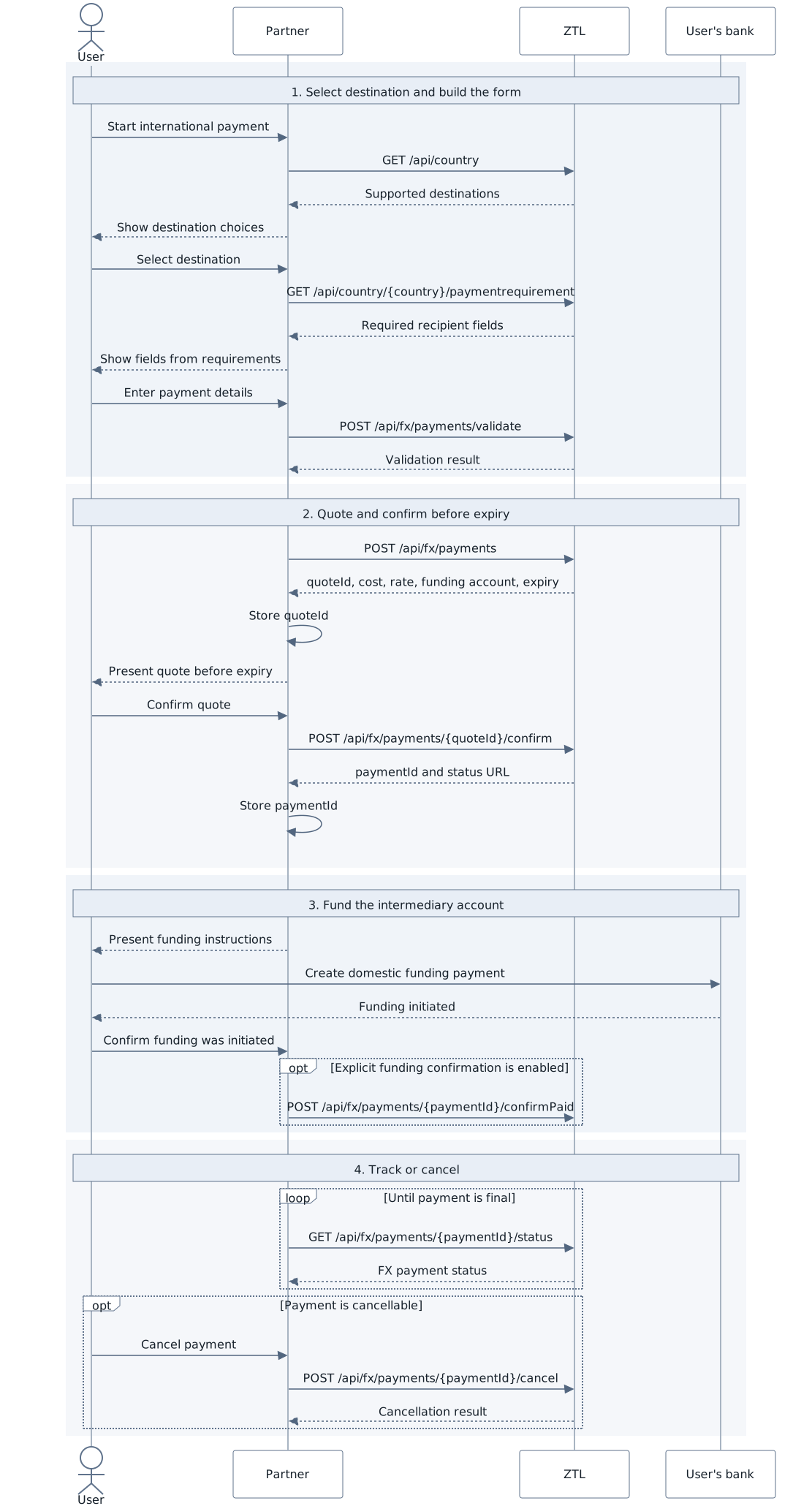
The diagram is supplemental; the list above is the complete textual flow.
Quote and creation handling
Section titled “Quote and creation handling”Treat the quote as time-limited. If confirmation endpoint reports that it expired, request a new quote and ask the user to confirm the new cost. A new quote ID and payment ID will be provided.
Currency exchange service is closed during weekends and requests during that time will be rejected. Other 422 codes focus on the request body fields. Present field-specific messages and keep the detailed code for support.
If the payment due date is today, or tomorrow when creating after 16:00, warn the user when the available balance is below the cost amount before confirmation.
Status and progress PDF
Section titled “Status and progress PDF”| Status | Final | Meaning |
|---|---|---|
Created |
No | A quote-related payment resource exists but is not yet fully confirmed. |
Confirmed |
No | The quote was confirmed; funding may still be pending. |
PaymentInProgress |
No | Funding or payout processing continues. |
Completed |
Yes | The payment completed. |
Cancelled |
Yes | The payment was cancelled. |
PaymentFailed |
Yes | Processing failed; preserve the technical message for support, not end-user display. |
GET /api/fx/payments/{paymentId}/progress-pdf maps Confirmed to
“Scheduled,” PaymentInProgress to “In progress,” and Completed to “Sent to
bank.” The report supplements, but does not replace, status polling.