
Domestic payments
Payment initiation and bank approval are separate resources. Store both IDs and poll both lifecycles.
There are currently two methods for creating domestic payments through our API.
The most common method is single-payment initiation, where each payment is initiated through a separate API call.
You can determine whether this method is supported by checking whether the bank supports the PAYMENT_DOMESTIC product.
The other method is bulk payments, where a list of payments is submitted in a single API call. This method is available when the bank supports the PAYMENT_BULK product. You can read more about each flow in the sections below.
Single-payment flow
Section titled “Single-payment flow”- Confirm
PAYMENT_DOMESTICsupport and bank constraints. - Create the resource with
POST /api/v2/paymentsand storepaymentId. - If the payment is
Unsignedor requires another signer, callPOST /api/v2/payments/approvewith one or more payment IDs. - Store the approval ID and present its redirect or QR SCA.
- When payments are signed using Redirect SCA, you can fetch the approval status after receiving the callback using
GET /api/v2/payments/approve/{id}. For QR SCA, you can actively poll the approval status until a final approval status is reached or the user exits the page. - Poll
GET /api/v2/payments/{paymentId}/statusuntil the payment is final. - If the payment remains eligible after an approval ends, create a fresh approval for the same payment instead of creating the payment again.
Subscribe to payment status webhooks to receive subsequent status changes, including changes after a payment was previously considered final. Webhooks complement status polling and reconciliation; approval status must still be checked separately.
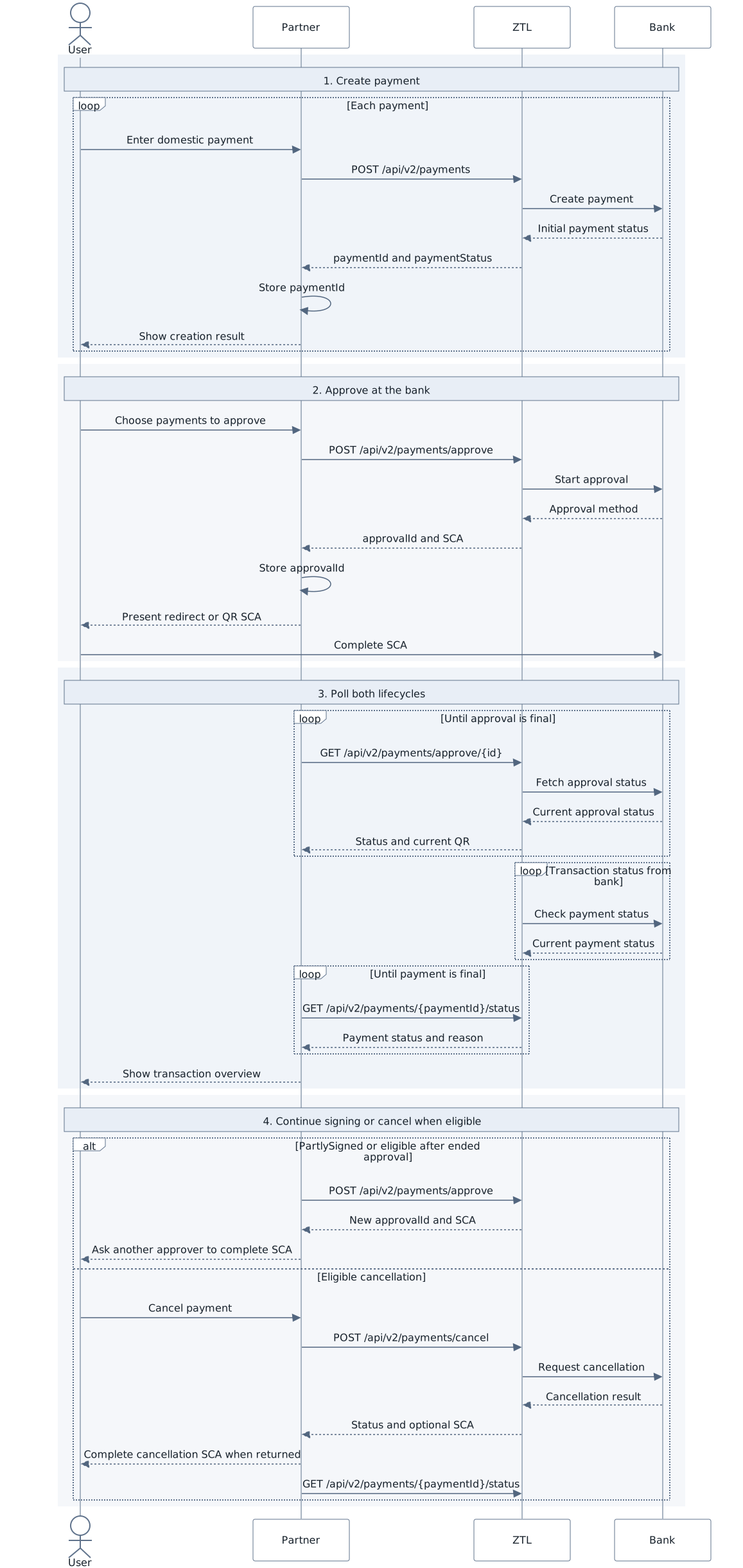
The browser return is not a payment result. The diagram is supplemental; the steps and status tables define the same flow in text.
Payment statuses
Section titled “Payment statuses”| Status | Final | Meaning and action |
|---|---|---|
Unsigned |
No | Bank approval is required. |
InProgress |
No | The bank is processing the payment. Continue polling. |
Completed |
Yes | The bank completed the payment. |
Rejected |
Yes | The payment was rejected. A rejection reason may be available in statusReasonText. |
Cancelled |
Yes | The payment was cancelled. |
CustomerActionRequired |
No | Inspect statusReason and guide the user. |
PartlySigned and other action reasons
Section titled “PartlySigned and other action reasons”| Status reason | Required handling |
|---|---|
PartlySigned |
At least one user has authorized the payment, but additional approval from another user is required. |
SmsConfirmationRequired |
Tell the user to complete the bank’s additional SMS confirmation, then continue polling. |
InsufficientFunds |
There are insufficient funds in the account. This status should be considered together with the payment status when determining what action to present to the user: - If the payment status is Rejected, the user may create a new payment.- If the payment status is CustomerActionRequired, the payment may still be completed if sufficient funds are received within X days. Otherwise, the payment status will eventually change to Rejected. |
Preserve statusReasonText for diagnostics without showing raw bank text as a
trusted end-user message.
Approval statuses and SCA
Section titled “Approval statuses and SCA”It is important to distinguish between approval status and payment status. Fetching the approval status is useful for understanding the SCA process, but in most cases it is optional and primarily informational. The payment status, on the other hand, should always be fetched and used to determine the actual state of the payment.
| Approval status | Meaning |
|---|---|
STARTED |
The SCA process has not yet been completed. |
ACCEPTED |
The approval finished successfully; continue polling each payment. |
REJECTED |
The bank or user rejected the approval. The payment may still be eligible for a fresh approval. |
CANCELLED |
The approval was cancelled. |
For Swedish QR SCA, fetch approval status every second and replace the displayed QR image because each image is short-lived. Keep the image link and refresh control keyboard accessible. Redirect SCA sends the user’s browser to the returned URL.
Cancellation
Section titled “Cancellation”A payment may be cancelled when eligible using POST /api/v2/payments/cancel.
The supported-bank response indicates whether cancellation requires SCA. In most cases, cancelling an unsigned payment does not require SCA, while some banks may require SCA when cancelling a signed payment.
When calling the cancellation API, the response indicates whether SCA is required. If required, present the returned SCA flow to the user accordingly. After receiving the callback, always fetch the payment status to determine the final state of the payment.
Bulk payments
Section titled “Bulk payments”Bulk payments are an alternative generally offered when the standard single-payment flow is not supported. It acts as a combination of payment initiation and approval within a single API call.
Today, this is used for Danske Bank in all supported countries and Handelsbanken in Sweden. However, this may change in the future, see the Bank API as the source of truth for currently supported products.
- Confirm that the
PAYMENT_BULKproduct is supported. - Create the bulk by submitting a list of payments to
POST /api/v2/payments/bulk, and store the returned bulk ID. The bulk may contain both domestic and cross-border payments. - Present the required SCA using either Redirect or QR depending on response
- Fetch the bulk status using
GET /api/v2/payments/bulk/{bulkId}/status. - The
transactionsfield is always present once the bulk reachesACCEPTED, but depending on the bank, it may be available earlier. Use it to retrieve the individualpaymentIdvalues. - Poll
GET /api/v2/payments/{paymentId}/statusfor each payment until it reaches a final status.
See the Payments API reference for exact request and response schemas.