ZTL OpenAPI (v2.0)
Download OpenAPI specification:
****Ztl Payment solution api
You can download the full spec by clicking on the button above, or at https://docs.ztlpay.io/ztl-api-v2.full.yaml
Below is a very short description of the main categories of services.
- Authentication - Used to create access token, needed in most API calls
- Onboarding - All users must onboard their company before the bank services can be used
- Banks - Services for available banks with product support and constraints
- Consent - Services for end user bank consents
- Accounts - Bank accounts services. Requires a valid consent.
- Payments - Services for domestic and cross-border payments. Requires a valid consent.
- Fx payments - Payment services used for partners which do not use bank integration
- Companies - Services to get an overview of all companies registered by a partner, and functionality to activate/deactivate company
- Country - Gives information about restrictions for sending payment to a country
- Currencies - Services for currency information
The first step to use the API is to have an onboarded company. The onboarding is initiated through the API, which returns an url which the user has to use to complete the onboarding process (KYC questions etc). The user can start to use the services once the user has completed the onboarding, and the onboarding status has been updated to 'Approved'.
To use ZTL open banking services, the user has to give consent which needs to be signed by the user. The consent is personal per user, and is linked to an organization. The consent gives ZTL access to retrieve account information and start payment initiation. Note that the user consent only gives access to start payment initiation, the user still needs to sign(authorize) payments before they are executed by the bank. The consent services has API to initiate the consent creation, and the consentId is used for Accounts and Payments services.
After the user has given consent, the next step is to retrieve available bank accounts the user has access to. Note that this service is only available right after the consent has been created, so it's recommended to fetch and store the account list right after the consent has been created. It's possible to fetch balance and account entries for the accounts.
Payment initiation can be started with consent, but requires an additional signing from the user.
The banks, currencies and country APIs can be used to get useful information like supported banks, products, countries etc.
- Most responses contain a header
ztl-request-id. This is a unique id for each request, and should be used if you need to contact ZTL support regarding problems with a specific API call. - PSU-User-Agent and PSU-IP-Address are used in many endpoints, and indicate if the user is present when a request is made. Please only use these headers when user is actually present(logged on in your system).
Error messages body format has been standardized, with some differences of available failure codes related to each endpoint - see description for available return values for each endpoint. ZTL may add more enums for error codes, so it's recommended to have general parser for the enum values that can handle unknown values. The following http error codes are recommended to handle:
- 400 - Bad Request. The message format contains a failure code, see each endpoint for available error codes.
{
  "failure": "Invalid_BBAN",
  "ztlRequestId": "350eb968-f4cf-474c-8cf2-f8068294d364 ",
  "message": "The provided BBAN was invalid"
}
409 - Conflict. This error indicates that there are some problems with simultaneous usage of consent. There is a very low chance for this situation to occur, and would normally be resolved by retrying the request.
422 - Input validation failed. This error indicates that there are issues with some of the input values. We provide a specific error code that is defined for each endpoint and error reason in English along with the path for the value that is invalid.
[
  {
    "code": "InvalidBBAN",
    "reason": "Invalid BBAN",
    "path": ".from.account"
  },
  {
    "code": "InvalidDueDate",
    "reason": "Due date cannot be in the past",
    "path": ".dueDate"
  }
]
- 500 - Internal Server Error. Indicates that some unhandled error has occurred. We do not recommend to show the message to end user in case of these error types.
{
  "ztlRequestId": "ENUM",
  "message": "The underlying reason for the error"
}
The following is a list of environments available when developing against or using our API:
| Resource | Sandbox | Prod |
|---|---|---|
| API Endpoint | https://api.sandbox.ztlpay-test.io | https://api.ztlpay.io |
| Authentication endpoint | https://oidc.sandbox.ztlpay-test.io | https://oidc.ztlpay.io |
| Onboarding endpoint | https://welcome.sandbox.ztlpay-test.io/onboarding | https://welcome.ztlpay.io/onboarding |
Here is a table listing the banks available for use in Sandbox. While other banks may function, they are not officially supported.
| Bank | Country | BIC | organizationNumber | userId | Notes |
|---|---|---|---|---|---|
| DNB | Norway | DNBANOKK | No requirements | TX99999 or TX99998 | Account 12095221031 and 12024833710 requires 2 approvers |
| Nordea | Norway | NDEANOKK | Must be 9 digits | Any valid norwegian SSN | |
| Nordea | Sweden | NDEASESS | Must be 10 or 12 digits | Non empty value | Issues showing completed status on payments. |
| Swedbank | Sweden | SANDSESS | No requirements | Any valid Swedish SSN | Be aware that bic in Sandbox and Production is different. |
| Nordea | Denmark | NDEADKKK | Must be 8 digits | Non empty value | |
| Mock bank | Denmark | ZTLXDKXX | No requirements | Non empty value | See further details below |
Testing with mock bank - Denmark
To help partners test Sandbox flows in Denmark, we provide a dedicated mock bank. The purpose of the mock bank is to make it possible to test supported happy-path flows and ensure all statuses are available in Sandbox. The functionality may change over time based on partner feedback and test needs.
- Consent: If you create a consent with
userIdset toREJECTEDorEXPIRED, the consent will end in that state after the user follows the consent link. All otheruserIdvalues are accepted. - Accounts: The Accounts functionality mainly supports happy-path scenarios. Balances and entries are based on completed transactions and are not generated randomly.
Payments
If any payment included in a payment approval uses account number 99990000000011, the approval is rejected.
If any payment included in a payment approval uses account number 99990000000012, the approval is cancelled.
The table below lists "to" account numbers with special behaviour.
All payments start in Unsigned, and the special logic is applied after the first approval unless otherwise noted.
Bulk payments are currently not supported for the mock bank, but is expected to be available soon.
| Account number | Status | Notes |
|---|---|---|
| 99990000000001 | Rejected | |
| 99990000000002 | CustomerActionRequired / PartlySigned | Requires two different user approvals to change status |
| 99990000000003 | CustomerActionRequired / SmsConfirmationRequired | Changes status after approximately 1 hour |
| 99990000000004 | CustomerActionRequired / InsufficientFunds | Becomes InsufficientFunds on dueDate, and Rejected the day after |
| 99990000000005 | InProgress | Moves to InProgress without approval |
| 99990000000011 | N/A | Payment approval will be Rejected |
| 99990000000012 | N/A | Payment approval will be Cancelled |
Most endpoints requires an access-token, which are used in the 'Authorization' header. Please contact ZTL support if you need to create new credentials or change existing secret.
Sandbox uses the new OIDC issuer only. Production supports both the new and legacy OIDC issuers during the migration period.
The created token is valid for 60 minutes (could be invalidated before), and should be reused until it is invalidated.
To use the token, set the header Authorization to Bearer ACCESS_TOKEN.
Expired token will result in 401 - Unauthorized, indicating that the partner needs to renew their token.
Fetch an access token from the new OIDC issuer
Use this endpoint for sandbox and production. Sandbox supports the new OIDC issuer only.
Request Body schema: application/json
| client_id required | string Client id as provided by ZTL |
| client_secret required | string Client secret as provided by ZTL |
| grant_type required | string Should be 'client_credentials' |
| scope required | string Use the scope for the target environment:
|
Responses
Request samples
- Payload
- Sandbox payload
- Production payload
{- "client_id": "string",
- "client_secret": "string",
- "grant_type": "string",
- "scope": "string"
}Response samples
- 200
- 401
{- "token_type": "Bearer",
- "expires_in": 3599,
- "ext_expires_in": 3599,
- "access_token": "jwt"
}Fetch an access token from the legacy OIDC issuer (LEGACY)
This legacy production endpoint remains available during the migration period. Sandbox supports the new OIDC issuer only.
Request Body schema: application/x-www-form-urlencoded
| client_id required | string Client id as provided by ZTL |
| client_secret required | string Client secret as provided by ZTL |
| grant_type required | string Should be 'client_credentials' |
| scope required | string Should be 'payments' |
Responses
Response samples
- 200
- 401
{- "access_token": "eyJhbGciOiJSUzI1NiIsImtpZCI6IkE1NEZCQjFGRjgzRTZFRUFEQUI1MTg4QTJBMkVGRDhGNTUzMEUzNDkiLCJ0eXAiOiJKV1QiLCJ4NXQiOiJwVS03SF9nLWJ1cmF0UmlLS2k3OWoxVXc0MGsifQ.eyJuYmYiOjE1NjI4MzE1OTIsImV4cCI6MTU2MjgzNTE5MiwiaXNzIjoiaHR0cHM6Ly9vaWRjLnp0bC5zdGFjY2Zsb3cubmV0IiwiYXVkIjpbImh0dHBzOi8vb2lkYy56dGwuc3RhY2NmbG93Lm5ldC9yZXNvdXJjZXMiLCJ6dGwtYXBpIiwicG9ydGFsLWFwaSJdLCJjbGllbnRfaWQiOiJkZXZjbGllbnQiLCJzY29wZSI6WyJwYXltZW50cyIsInBvcnRhbC1hcGkiXX0.dJuDJNTsSBhQ_xmN3ruqbBZvJdyn2nUkUW3NEwbgXw_l-UA3_XRmtp16rWWdhMLbh-D_HywwG2a0h-MK2tX17C-ggsfp_pDxj8iy8aLleI3dY1qt0VkQY8rOw5_YtWa40HWwIBK9Ll8MqovwBK4lg9Pkq_KLGdkoz87n63QezS5u0JeWYJJnHFuY5ojX_M5szAdSYoVYOyvL0tr30ynxb3joglKrVWlkeawRZztRV4chFN00tlv_Tn54vDYOyDPtBWK6JpMVqhHla8a5JnslJu5dUP82qtgms_lFYOiR1oD2jaa-t0QTE6MVwspG3kwQBSSSZawe-9G4yEBg-nFSGg",
- "expires_in": 3600,
- "token_type": "Bearer",
- "scope": "payments"
}The first step before using the ZTL API is to onboard the company.
Onboarding lifecycle
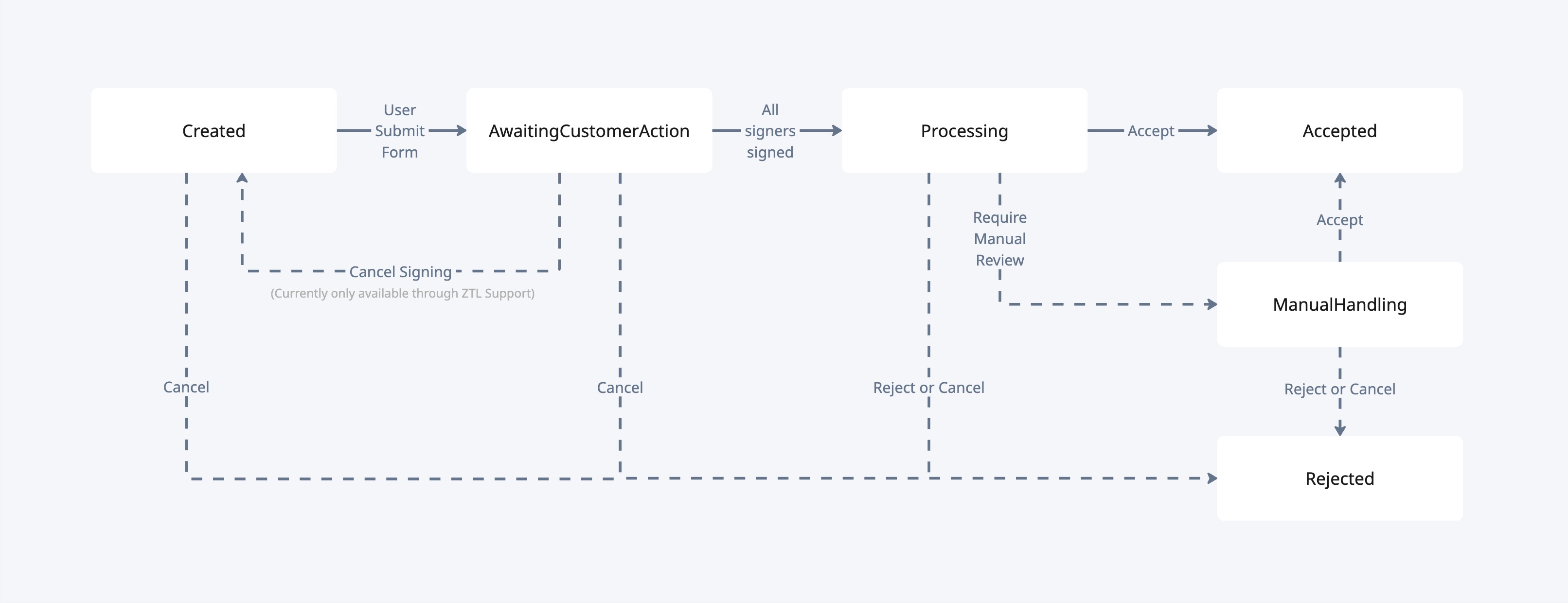
An onboarding starts in Created and moves through the lifecycle until it reaches a final status.
The final statuses are:
AcceptedRejected
Below is an overview of the onboarding statuses and what they mean.
| Status | Meaning |
|---|---|
Created |
The onboarding has been started, but the user has not yet submitted the onboarding form for signing. |
AwaitingCustomerAction |
The onboarding form has been submitted, and one or more required signers still need to sign the agreement. |
Processing |
All required signers have signed, and ZTL is processing the onboarding. This is typically a very short-lived status. |
ManualHandling |
The onboarding requires manual review by ZTL before it can continue to a final status. |
Accepted |
The onboarding has been completed successfully, and the company can use the APIs. |
Rejected |
The onboarding has been rejected, cancelled, or expired and cannot continue further. |
General implementation considerations
When implementing onboarding in your integration, keep the following in mind.
All onboarding behavior described below applies per partner integration. This means that a company may already be onboarded through another ZTL partner without affecting your ability to onboard the same organization number in your own integration.
| Existing state for the organization number | Result when initiating onboarding |
|---|---|
| No existing onboarding and no onboarded company exists | A new onboarding is created |
Existing onboarding in Created |
The existing onboarding ID and onboarding URL are returned instead of creating a new onboarding |
Existing onboarding in AwaitingCustomerAction, Processing, or ManualHandling |
A new onboarding cannot be started |
| Existing onboarded company already exists | A new onboarding cannot be started in PRODUCTION |
Existing onboarding in Rejected |
A new onboarding can be started |
In addition:
- In
PRODUCTION, each company can only have one active onboarding at a time until it reaches a final status. - If an onboarding remains in
CreatedorAwaitingCustomerActionfor more than 45 days, it is automatically cancelled by the system and moved toRejected. - If an onboarding has been moved to
Rejecteddue to inactivity, the company must restart the onboarding flow from the beginning before it can use the APIs.
Sandbox behavior
Sandbox behavior differs somewhat from production, because available test data varies between countries.
- In
Norway,Denmark, andSweden,SANDBOXsupports both reserved ZTL test scenarios and a normal integrated sandbox flow. - Country-specific testing guidance is provided in the sections below.
Reserved ZTL test scenarios
Reserved ZTL test scenarios are special organization numbers set up by ZTL to always produce a specific onboarding outcome.
The country-specific organization numbers differ, and are listed in each country chapter below.
For reserved ZTL test scenarios, ZTL does not use the normal sandbox or external integrations for company data, beneficial owners, signing combinations, and screening.
Instead, ZTL provides the test data directly in our own sandbox logic. This is done to make the result deterministic, so you can reliably test the onboarding lifecycle and reach the same final status every time.
These reserved organization numbers can also be used repeatedly in SANDBOX, even if a company or previous successful onboarding already exists for your partner integration.
There are two different ways to test onboarding in Norway SANDBOX, depending on what you want to verify.
Test data
There are two types of test data available for Norway in SANDBOX:
- Reserved ZTL test scenarios
- Integrated sandbox flow
Reserved ZTL test scenarios
The organization numbers below use the reserved ZTL test scenarios described in the general sandbox testing section above.
| Organization number | Expected status after signing is completed |
|---|---|
111111111 |
Accepted |
222222222 |
ManualHandling |
333333333 |
Rejected |
Integrated sandbox flow
This is the normal Norway sandbox flow.
Below is a selection of test data from our test environment that can be used as input when testing our APIs. The list below is not an exhaustive overview of all available test data.
We use Tenor as the source for test data. Tenor is provided by the Norwegian Tax Administration and contains thousands of test companies that can be used for development and testing purposes.
All available test data can be found at: https://www.skatteetaten.no/testdata/
| Organization number | Organization name |
|---|---|
312701103 |
LEKKER GILD STRUTS UAB |
312246538 |
OPPRETT SKAMFULL STRUTS AB |
312587629 |
NÆR HÅRSÅR STRUTS LTD |
310211036 |
POMPØS KNUSLETE LEOPARD ASA |
310223719 |
FREDELIG TYPISK GIRAFF SPAREBANK |
313513408 |
FALSK ØDE TIGER AS |
314208641 |
EKSTRA KLOK TIGER AS |
210129812 |
SPETTETE INNSIKTSFULL HUND DA |
314270320 |
TRÅDLØS MATT TIGER AS |
313513580 |
OVERSIGHT HELLIG TIGER AS |
310163449 |
SENTRAL UKLAR PUMA |
310274682 |
HEL VERD NISE PENSJONSKASSE |
310219622 |
STOLT UMUSIKALSK ALLIGATOR |
Testing signing
How you should test signing depends on which type of Norway sandbox data you are using.
Reserved ZTL test scenarios
- Start onboarding with country
NOand one of the organization numbers above. - Fill in the onboarding as normal, but make sure to keep beneficial owners as is (do not edit, add, or remove them).
- Complete signing with the signing option shown in the onboarding flow.
Integrated sandbox flow
- Start onboarding with one of the Tenor organization numbers listed above or another valid Tenor test company.
- In the onboarding process, select the signing option shown in the onboarding page.
- Complete signing in Signicat.
In most cases, signing in Norway SANDBOX works with the standard Norwegian test credentials below:
- one-time password:
otp - password:
qwer1234
How it normally works
By default, the signer’s SSN is prefilled to Signicat. Because of this, the signer is normally asked only for one-time password and password, and not for SSN.
Important note about shared test users
The pre-generated Norwegian test users are shared by everyone using Sandbox. This means they can occasionally become unavailable if someone enters the wrong password too many times.
If signing fails for this reason, create your own test user in Signicat instead: Create your own Norwegian test user
This avoids conflicts with shared users and is the recommended fallback if the standard flow does not work.
If the default credentials do not work
If signing does not work with the prefilled signer, Signicat may ask you to enter SSN manually.
In that case:
- Enter the SSN for your own Signicat test user
- Use:
- one-time password:
otp - password:
qwer1234
- one-time password:
Because this is your own generated test user, it should not conflict with other Sandbox users.
Recommendation
If you test Norway signing often, it is a good idea to create your own Signicat test user and keep the SSN available for reuse in later tests.
Which should you use?
- Use
111111111,222222222, and333333333when you want a predictable onboarding result. - Use the integrated sandbox flow when you want to test the normal sandbox integrations with Tenor-based company data.
Note on Signing Combinations in the Integrated Norway Sandbox Flow
In the integrated Norway sandbox flow, all company information except signing combinations is sourced from Tenor, allowing access to a large and realistic set of test companies.
However, signing combinations are currently provided by a separate data source with a limited set of predefined test companies. As a result, when a Tenor company is used in the test environment, it is internally mapped to one of a small number (approximately 10) of signing-combination test companies.
As a result, different test companies may therefore return identical signing combinations. This behavior is expected and does not indicate an error or incorrect company data. This mapping is only applicable in the test environment and exists to ensure consistent and predictable signing-combination behavior during development and testing.
There are two different ways to test onboarding in Denmark SANDBOX, depending on what you want to verify.
Test data
There are two types of test data available for Denmark in SANDBOX:
- Reserved ZTL test scenarios
- Integrated sandbox flow
Reserved ZTL test scenarios
The organization numbers below use the reserved ZTL test scenarios described in the general sandbox testing section above.
| Organization number | Expected status after signing is completed |
|---|---|
11111111 |
Accepted |
22222222 |
ManualHandling |
33333333 |
Rejected |
With the normal Denmark sandbox flow, several parts of the onboarding depend on external test environments. Those environments have limited and sometimes inflexible test data, and they are not designed to guarantee that a given onboarding always ends in exactly the status you want.
This is why the reserved ZTL test scenarios are useful when you want a stable and repeatable result.
Integrated sandbox flow
This is the normal Denmark sandbox flow.
For these organization numbers, ZTL uses the external sandbox environments in the usual way:
- Company information is fetched from external test data sources
- Beneficial owners are fetched from external test data sources
- Signing combinations are fetched from external test data sources
- Screening is performed in the AML provider’s test environment
This means the onboarding is closer to the normal integrated flow, but it is also less predictable if your goal is to force a specific final status.
| Organization number | Person (Name) |
|---|---|
23456788 |
Christian Svanholm-Nielsen |
41773863 |
Sven Holst |
12345674 |
Tage Olsen |
38724991 |
Bettina Christiansen |
Testing signing
How you should test signing depends on which type of Denmark sandbox data you are using.
Reserved ZTL test scenarios
- Start onboarding with country
DKand one of the organization numbers above. - Fill in the onboarding as normal, but make sure to keep beneficial owners as is (do not edit, add, or remove them).
- Complete signing with any available sandbox test user.
- You do not need to create a specific signer identity for these organization numbers.
- You can use any available sandbox signing method that works in your setup.
Integrated sandbox flow
- Create a test MitID here: pp.mitid.dk/test-tool/frontend/#/create-identity
- Use the name connected to the organization number you want to test.
- Start onboarding with that organization number.
- In the onboarding page, select the signing option shown.
- Sign with the matching test MitID user.
Which should you use?
- Use
11111111,22222222, and33333333when you want a predictable onboarding result. - Use the integrated sandbox flow when you want to test the normal integrated sandbox flow against external test environments.
There are two different ways to test onboarding in Sweden SANDBOX, depending on what you want to verify.
Test data
There are two types of test data available for Sweden in SANDBOX:
- Reserved ZTL test scenarios
- Integrated sandbox flow
Reserved ZTL test scenarios
The organization numbers below use the reserved ZTL test scenarios described in the general sandbox testing section above.
| Organization number | Expected status after signing is completed |
|---|---|
1111111111 |
Accepted |
2222222222 |
ManualHandling |
3333333333 |
Rejected |
Integrated sandbox flow
This is the normal Sweden sandbox flow.
Below is a selection of test data from our sandbox environment that can be used when testing onboarding in Sweden.
| Organization number | Person (Personal No / Name) |
|---|---|
5560572850 |
— |
5565002465 |
— |
8430025331 |
— |
5569030264 |
— |
6805029268 |
196805029268 – Petra Efternamn2401 |
5564779444 |
196805029268 – Petra Efternamn2401 |
5569994600 |
197904182396 – Kuno Efternamn2993 |
9168937861 |
— |
5590506506 |
196501022773 – Pinoz Harem |
5164010133 |
— |
5590672613 |
— |
8110022392 |
198110022392 – Ebbe Efternamn3672 |
9697715770 |
— |
5564866803 |
196805029268 – Petra Efternamn2401 |
5564881422 |
198110022392 – Ebbe Efternamn3672 |
Important
- Not all organization numbers have a signer that can be used for end-to-end signing tests.
- If the table shows
—, the company can still be used for some onboarding testing, but not for a full signing flow with a matching signer identity. - If you want to test the full onboarding flow including signing, choose an organization number that has a personal number and name listed.
Testing signing
How you should test signing depends on which type of Sweden sandbox data you are using.
Reserved ZTL test scenarios
- Start onboarding with country
SEand one of the organization numbers above. - Fill in the onboarding as normal, but make sure to keep beneficial owners as is (do not edit, add, or remove them).
- Complete signing with the signing option shown in the onboarding flow.
Integrated sandbox flow
To test the full onboarding flow in Sweden, including signing the agreement in SANDBOX, follow these steps:
- Create a test BankID here: www.bankid.com/en/utvecklare/test/skaffa-testbankid
- Use one of the personal numbers listed in the table above.
- Start onboarding with the matching organization number.
- In the onboarding process, select the signing option shown in the onboarding page.
- Complete signing with the BankID test user that matches the personal number used when creating the test BankID.
Which should you use?
- Use
1111111111,2222222222, and3333333333when you want a predictable onboarding result. - Use the integrated sandbox flow when you want to test the normal integrated sandbox flow against external test environments.
Initiate onboarding
header Parameters
| Authorization | string <Bearer JWT> Example: Bearer eyJhbGciOiJSUzI1NiIsImtpZCI6IkE1NEZCQjFGRjgzRTZFRUFEQUI1MTg4QTJBMkVGRDhGNTUzMEUzNDkiLCJ0eXAiOiJKV1QiLCJ4NXQiOiJwVS03SF9nLWJ1cmF0UmlLS2k3OWoxVXc0MGsifQ.eyJuYmYiOjE1NjI4MzE1OTIsImV4cCI6MTU2MjgzNTE5MiwiaXNzIjoiaHR0cHM6Ly9vaWRjLnp0bC5zdGFjY2Zsb3cubmV0IiwiYXVkIjpbImh0dHBzOi8vb2lkYy56dGwuc3RhY2NmbG93Lm5ldC9yZXNvdXJjZXMiLCJ6dGwtYXBpIiwicG9ydGFsLWFwaSJdLCJjbGllbnRfaWQiOiJkZXZjbGllbnQiLCJzY29wZSI6WyJwYXltZW50cyIsInBvcnRhbC1hcGkiXX0.dJuDJNTsSBhQ_xmN3ruqbBZvJdyn2nUkUW3NEwbgXw_l-UA3_XRmtp16rWWdhMLbh-D_HywwG2a0h-MK2tX17C-ggsfp_pDxj8iy8aLleI3dY1qt0VkQY8rOw5_YtWa40HWwIBK9Ll8MqovwBK4lg9Pkq_KLGdkoz87n63QezS5u0JeWYJJnHFuY5ojX_M5szAdSYoVYOyvL0tr30ynxb3joglKrVWlkeawRZztRV4chFN00tlv_Tn54vDYOyDPtBWK6JpMVqhHla8a5JnslJu5dUP82qtgms_lFYOiR1oD2jaa-t0QTE6MVwspG3kwQBSSSZawe-9G4yEBg-nFSGg Bearer Authorization token - A JWT token used to authenticate the request. Please refer to the Authorization section of our docs. |
Request Body schema: application/json
| country required | string Countrycode for the company being onboarded |
| organizationNumber required | string Organization number for the company being onboarding |
| redirectUrl | string The user is redirected to this URL after the onboarding process has completed as well as if they cancel the onboarding process. Normally this will be the URL of the ERP the end-user originated from. Must start with a protocol (HTTP/HTTPS). |
Responses
Request samples
- Payload
{- "country": "SE",
- "organizationNumber": "5569994600",
}Response samples
- 200
- 400
- 403
- 409
- 500
- 503
{- "id": "941d1877-73b8-45bf-8c65-47233b58926a",
}Get onboarding status
path Parameters
| onboardingId required | string <uuid> |
header Parameters
| Authorization | string <Bearer JWT> Example: Bearer eyJhbGciOiJSUzI1NiIsImtpZCI6IkE1NEZCQjFGRjgzRTZFRUFEQUI1MTg4QTJBMkVGRDhGNTUzMEUzNDkiLCJ0eXAiOiJKV1QiLCJ4NXQiOiJwVS03SF9nLWJ1cmF0UmlLS2k3OWoxVXc0MGsifQ.eyJuYmYiOjE1NjI4MzE1OTIsImV4cCI6MTU2MjgzNTE5MiwiaXNzIjoiaHR0cHM6Ly9vaWRjLnp0bC5zdGFjY2Zsb3cubmV0IiwiYXVkIjpbImh0dHBzOi8vb2lkYy56dGwuc3RhY2NmbG93Lm5ldC9yZXNvdXJjZXMiLCJ6dGwtYXBpIiwicG9ydGFsLWFwaSJdLCJjbGllbnRfaWQiOiJkZXZjbGllbnQiLCJzY29wZSI6WyJwYXltZW50cyIsInBvcnRhbC1hcGkiXX0.dJuDJNTsSBhQ_xmN3ruqbBZvJdyn2nUkUW3NEwbgXw_l-UA3_XRmtp16rWWdhMLbh-D_HywwG2a0h-MK2tX17C-ggsfp_pDxj8iy8aLleI3dY1qt0VkQY8rOw5_YtWa40HWwIBK9Ll8MqovwBK4lg9Pkq_KLGdkoz87n63QezS5u0JeWYJJnHFuY5ojX_M5szAdSYoVYOyvL0tr30ynxb3joglKrVWlkeawRZztRV4chFN00tlv_Tn54vDYOyDPtBWK6JpMVqhHla8a5JnslJu5dUP82qtgms_lFYOiR1oD2jaa-t0QTE6MVwspG3kwQBSSSZawe-9G4yEBg-nFSGg Bearer Authorization token - A JWT token used to authenticate the request. Please refer to the Authorization section of our docs. |
Responses
Response samples
- 200
- 400
- 403
- 500
- 503
{- "status": "AwaitingCustomerAction",
- "signingStatus": {
- "onboardingSigningStatus": "PartiallySigned",
- "signers": [
- {
- "name": "John Doe",
- "personalNumber": "01019012345",
- "status": "Signed",
- "documentSignature": {
- "signatureMethod": "BANKID_NO",
- "fullName": "John Doe",
- "firstName": "John",
- "lastName": "Doe",
- "middleName": null,
- "signedTime": "2026-01-03T22:57:23",
- "dateOfBirth": "1990-01-01"
}
}, - {
- "name": "Jane Smith",
- "personalNumber": null,
- "status": "Unsigned",
- "documentSignature": null
}
]
}
}Get onboarding status by organization number
Returns the onboarding status based on country and organization number. If no onboarding exists but the company already exists, the response returns Accepted. This can happen if the company was onboarded through the deprecated Onboarding V1 flow.
query Parameters
| country required | string Enum: "NO" "SE" "DK" |
| organizationNumber required | string |
header Parameters
| Authorization | string <Bearer JWT> Example: Bearer eyJhbGciOiJSUzI1NiIsImtpZCI6IkE1NEZCQjFGRjgzRTZFRUFEQUI1MTg4QTJBMkVGRDhGNTUzMEUzNDkiLCJ0eXAiOiJKV1QiLCJ4NXQiOiJwVS03SF9nLWJ1cmF0UmlLS2k3OWoxVXc0MGsifQ.eyJuYmYiOjE1NjI4MzE1OTIsImV4cCI6MTU2MjgzNTE5MiwiaXNzIjoiaHR0cHM6Ly9vaWRjLnp0bC5zdGFjY2Zsb3cubmV0IiwiYXVkIjpbImh0dHBzOi8vb2lkYy56dGwuc3RhY2NmbG93Lm5ldC9yZXNvdXJjZXMiLCJ6dGwtYXBpIiwicG9ydGFsLWFwaSJdLCJjbGllbnRfaWQiOiJkZXZjbGllbnQiLCJzY29wZSI6WyJwYXltZW50cyIsInBvcnRhbC1hcGkiXX0.dJuDJNTsSBhQ_xmN3ruqbBZvJdyn2nUkUW3NEwbgXw_l-UA3_XRmtp16rWWdhMLbh-D_HywwG2a0h-MK2tX17C-ggsfp_pDxj8iy8aLleI3dY1qt0VkQY8rOw5_YtWa40HWwIBK9Ll8MqovwBK4lg9Pkq_KLGdkoz87n63QezS5u0JeWYJJnHFuY5ojX_M5szAdSYoVYOyvL0tr30ynxb3joglKrVWlkeawRZztRV4chFN00tlv_Tn54vDYOyDPtBWK6JpMVqhHla8a5JnslJu5dUP82qtgms_lFYOiR1oD2jaa-t0QTE6MVwspG3kwQBSSSZawe-9G4yEBg-nFSGg Bearer Authorization token - A JWT token used to authenticate the request. Please refer to the Authorization section of our docs. |
Responses
Response samples
- 200
- 400
- 403
- 500
- 503
{- "status": "Accepted"
}Register company (AIS only)
This API is for partners using AIS only in Norway. Its not be used without prior agreement. Simple registration for companies. Provides access exclusively to account information services. Supported countries are NO, SE and DK.
header Parameters
| Authorization | string <Bearer JWT> Example: Bearer eyJhbGciOiJSUzI1NiIsImtpZCI6IkE1NEZCQjFGRjgzRTZFRUFEQUI1MTg4QTJBMkVGRDhGNTUzMEUzNDkiLCJ0eXAiOiJKV1QiLCJ4NXQiOiJwVS03SF9nLWJ1cmF0UmlLS2k3OWoxVXc0MGsifQ.eyJuYmYiOjE1NjI4MzE1OTIsImV4cCI6MTU2MjgzNTE5MiwiaXNzIjoiaHR0cHM6Ly9vaWRjLnp0bC5zdGFjY2Zsb3cubmV0IiwiYXVkIjpbImh0dHBzOi8vb2lkYy56dGwuc3RhY2NmbG93Lm5ldC9yZXNvdXJjZXMiLCJ6dGwtYXBpIiwicG9ydGFsLWFwaSJdLCJjbGllbnRfaWQiOiJkZXZjbGllbnQiLCJzY29wZSI6WyJwYXltZW50cyIsInBvcnRhbC1hcGkiXX0.dJuDJNTsSBhQ_xmN3ruqbBZvJdyn2nUkUW3NEwbgXw_l-UA3_XRmtp16rWWdhMLbh-D_HywwG2a0h-MK2tX17C-ggsfp_pDxj8iy8aLleI3dY1qt0VkQY8rOw5_YtWa40HWwIBK9Ll8MqovwBK4lg9Pkq_KLGdkoz87n63QezS5u0JeWYJJnHFuY5ojX_M5szAdSYoVYOyvL0tr30ynxb3joglKrVWlkeawRZztRV4chFN00tlv_Tn54vDYOyDPtBWK6JpMVqhHla8a5JnslJu5dUP82qtgms_lFYOiR1oD2jaa-t0QTE6MVwspG3kwQBSSSZawe-9G4yEBg-nFSGg Bearer Authorization token - A JWT token used to authenticate the request. Please refer to the Authorization section of our docs. |
Request Body schema: application/json
| country required | string Country code for the company being registered |
| organizationNumber required | string Organization number for the company being registered |
Responses
Request samples
- Payload
{- "country": "SE",
- "organizationNumber": "5569994600"
}Response samples
- 400
- 500
- 503
{- "ztlRequestId": "3a797348-ef0c-4f52-b821-fdfcdb98c4d9",
- "message": "Invalid account"
}Initiate enablement of international payments
Starts the enablement flow for international payments for an existing company and returns the frontend URL for the form.
header Parameters
| Authorization | string <Bearer JWT> Example: Bearer eyJhbGciOiJSUzI1NiIsImtpZCI6IkE1NEZCQjFGRjgzRTZFRUFEQUI1MTg4QTJBMkVGRDhGNTUzMEUzNDkiLCJ0eXAiOiJKV1QiLCJ4NXQiOiJwVS03SF9nLWJ1cmF0UmlLS2k3OWoxVXc0MGsifQ.eyJuYmYiOjE1NjI4MzE1OTIsImV4cCI6MTU2MjgzNTE5MiwiaXNzIjoiaHR0cHM6Ly9vaWRjLnp0bC5zdGFjY2Zsb3cubmV0IiwiYXVkIjpbImh0dHBzOi8vb2lkYy56dGwuc3RhY2NmbG93Lm5ldC9yZXNvdXJjZXMiLCJ6dGwtYXBpIiwicG9ydGFsLWFwaSJdLCJjbGllbnRfaWQiOiJkZXZjbGllbnQiLCJzY29wZSI6WyJwYXltZW50cyIsInBvcnRhbC1hcGkiXX0.dJuDJNTsSBhQ_xmN3ruqbBZvJdyn2nUkUW3NEwbgXw_l-UA3_XRmtp16rWWdhMLbh-D_HywwG2a0h-MK2tX17C-ggsfp_pDxj8iy8aLleI3dY1qt0VkQY8rOw5_YtWa40HWwIBK9Ll8MqovwBK4lg9Pkq_KLGdkoz87n63QezS5u0JeWYJJnHFuY5ojX_M5szAdSYoVYOyvL0tr30ynxb3joglKrVWlkeawRZztRV4chFN00tlv_Tn54vDYOyDPtBWK6JpMVqhHla8a5JnslJu5dUP82qtgms_lFYOiR1oD2jaa-t0QTE6MVwspG3kwQBSSSZawe-9G4yEBg-nFSGg Bearer Authorization token - A JWT token used to authenticate the request. Please refer to the Authorization section of our docs. |
Request Body schema: application/json
| country required | string Country code for the company |
| organizationNumber required | string Organization number for the company |
| redirectUrl | string The user is redirected to this URL after the enablement flow has completed as well as if they cancel the process. Must start with a protocol (HTTP/HTTPS). |
Responses
Request samples
- Payload
{- "country": "SE",
- "organizationNumber": "5569994600",
}Response samples
- 200
- 400
- 403
- 500
- 503
Cancel onboarding
path Parameters
| onboardingId required | string <uuid> |
header Parameters
| Authorization | string <Bearer JWT> Example: Bearer eyJhbGciOiJSUzI1NiIsImtpZCI6IkE1NEZCQjFGRjgzRTZFRUFEQUI1MTg4QTJBMkVGRDhGNTUzMEUzNDkiLCJ0eXAiOiJKV1QiLCJ4NXQiOiJwVS03SF9nLWJ1cmF0UmlLS2k3OWoxVXc0MGsifQ.eyJuYmYiOjE1NjI4MzE1OTIsImV4cCI6MTU2MjgzNTE5MiwiaXNzIjoiaHR0cHM6Ly9vaWRjLnp0bC5zdGFjY2Zsb3cubmV0IiwiYXVkIjpbImh0dHBzOi8vb2lkYy56dGwuc3RhY2NmbG93Lm5ldC9yZXNvdXJjZXMiLCJ6dGwtYXBpIiwicG9ydGFsLWFwaSJdLCJjbGllbnRfaWQiOiJkZXZjbGllbnQiLCJzY29wZSI6WyJwYXltZW50cyIsInBvcnRhbC1hcGkiXX0.dJuDJNTsSBhQ_xmN3ruqbBZvJdyn2nUkUW3NEwbgXw_l-UA3_XRmtp16rWWdhMLbh-D_HywwG2a0h-MK2tX17C-ggsfp_pDxj8iy8aLleI3dY1qt0VkQY8rOw5_YtWa40HWwIBK9Ll8MqovwBK4lg9Pkq_KLGdkoz87n63QezS5u0JeWYJJnHFuY5ojX_M5szAdSYoVYOyvL0tr30ynxb3joglKrVWlkeawRZztRV4chFN00tlv_Tn54vDYOyDPtBWK6JpMVqhHla8a5JnslJu5dUP82qtgms_lFYOiR1oD2jaa-t0QTE6MVwspG3kwQBSSSZawe-9G4yEBg-nFSGg Bearer Authorization token - A JWT token used to authenticate the request. Please refer to the Authorization section of our docs. |
Responses
Response samples
- 400
- 500
- 503
{- "ztlRequestId": "3a797348-ef0c-4f52-b821-fdfcdb98c4d9",
- "message": "Invalid account"
}Services for all bank-related information. Gives list of all banks ZTL supports, which products support each bank and bank-specific restrictions like max data length for fields.
Supported banks
List of supported banks, with known constraints. Due to variations in the PSD2 APIs of the different banks, initiating a payment with certain banks may be subject to some limitations
Authorizations:
path Parameters
| countryCode required | string <ISO-3166> Example: NO Country code, ISO-3166 |
Responses
Response samples
- 200
- 400
[- {
- "bic": "DNBANOKK",
- "constraints": {
- "maxBasketSize": 20,
- "maxInformationFieldLength": 35,
- "maxUnstructuredRemittanceInfoLength": 108,
- "aisMaxDateRangeMonths": 12,
- "cancelSCARequired": true,
- "validInformationFieldCharactersPattern": "[A-ZÆØÅa-zæøå0-9\\\\D]",
- "aisMaxDateRangeNote": "Supports up to 24 months if consent age < 1h",
- "maxBulkSize": 20
}, - "countryCode": "NO",
- "name": "DNB BANK ASA",
- "platform": "EVRY",
- "bankAlliance": "SPAREBANK_1",
- "supportedProducts": [
- "PAYMENT_DOMESTIC"
], - "branches": [
- {
- "name": "District",
- "branch": "DISTRICT",
- "constraints": {
- "maxBasketSize": 20,
- "maxInformationFieldLength": 35,
- "maxUnstructuredRemittanceInfoLength": 108,
- "aisMaxDateRangeMonths": 12,
- "cancelSCARequired": true,
- "validInformationFieldCharactersPattern": "[A-ZÆØÅa-zæøå0-9\\\\D]",
- "aisMaxDateRangeNote": "Supports up to 24 months if consent age < 1h",
- "maxBulkSize": 20
}
}
]
}
]A valid Consent is required to use the Accounts and Payments services. A consent has to be signed by a user to be valid, and is personal for that user and limited to bank services for the bank the consent was created with. A newly created consent is normally valid for 180 days, but note that it may be invalidated at any time. Consents created by V1 API are not compatible for V2 endpoints, and V2 consents can neither be used for V1 endpoints.
Create consent
Create consent and starts authentication process automatically (SCA details is available in response body). For banks having different branches, please refer to the banks api for available branches. Note that the existing consents from V1 are not compatible for V2 endpoints, so all users needs to create new consent before using V2 endpoints. V2 consents can neither be used for V1 endpoints.
Authorizations:
header Parameters
| PSU-IP-Address required | string Example: 192.158.1.38 AAA IP Address of the end-user initiating the payment. DO NOT use any other IP address than what you can collect from the current user session that uses your system (don't use something stored in your DB). This information is used by the banks to manage traffic and handle security. |
| PSU-User-Agent required | string Example: Mozilla/5.0 (Windows NT 10.0; …) Gecko/20100101 Firefox/63.0 The forwarded Agent header field of the HTTP request between PSU and TPP. |
Request Body schema: application/json
| userId required | string The userId of the account owner providing consent. Different banks use different userId schema, Could be SSN or a userId provided by the bank. |
| bic required | string The bank's international code/address. Also know as Swift code. |
| callbackUrl required | string Sca callback url for Redirect authentication |
| organizationNumber required | string The organization number |
| preferredScaMethod | string Enum: "Qr" "Redirect" The preferred way to perform authorization. There is no guarantee that bank supports the preferred method.
|
| bankBranch | string Which branch of the bank if multiple. Can be fetched from supported banks endpoint. |
Responses
Request samples
- Payload
{- "userId": "string",
- "bic": "ESSESESS",
- "organizationNumber": "1234567890",
- "preferredScaMethod": "Qr",
- "bankBranch": "string"
}Response samples
- 200
- 400
- 403
- 409
- 500
- 503
{- "id": "B44E9297-934D-4975-8951-7843B16DF63F",
- "status": "AWAITING_AUTHORIZATION",
- "sca": {
- "type": "redirect",
}
}Consent status
Authorizations:
header Parameters
| consent-id required | string <uuid> Example: 3a797348-ef0c-4f52-b821-fdfcdb98c4d9 A valid consentId |
| PSU-IP-Address | string Example: 192.158.1.38 AAA IP Address of the end-user initiating the payment. DO NOT use any other IP address than what you can collect from the current user session that uses your system (don't use something stored in your DB). This information is used by the banks to manage traffic and handle security. |
| PSU-User-Agent | string Example: Mozilla/5.0 (Windows NT 10.0; …) Gecko/20100101 Firefox/63.0 The forwarded Agent header field of the HTTP request between PSU and TPP. |
Responses
Response samples
- 200
- 400
- 403
- 404
- 409
- 500
- 503
{- "id": "B44E9297-934D-4975-8951-7843B16DF63F",
- "status": "AWAITING_AUTHORIZATION",
- "sca": {
- "type": "redirect",
}, - "validUntil": "2022-01-01"
}Revoke consent
Authorizations:
header Parameters
| consent-id required | string <uuid> Example: 3a797348-ef0c-4f52-b821-fdfcdb98c4d9 A valid consentId |
| PSU-IP-Address required | string Example: 192.158.1.38 AAA IP Address of the end-user initiating the payment. DO NOT use any other IP address than what you can collect from the current user session that uses your system (don't use something stored in your DB). This information is used by the banks to manage traffic and handle security. |
| PSU-User-Agent required | string Example: Mozilla/5.0 (Windows NT 10.0; …) Gecko/20100101 Firefox/63.0 The forwarded Agent header field of the HTTP request between PSU and TPP. |
Responses
Response samples
- 400
- 403
- 404
- 409
- 500
- 503
{- "ztlRequestId": "3a797348-ef0c-4f52-b821-fdfcdb98c4d9",
- "message": "Invalid account"
}API for getting account information. We try to provide a failure enum when possible, you should expect us to add more values here continuously.
The banks make a VERY IMPORTANT distinction between if the user is present or not through the PSU-IP-Address and PSU-User-Agent headers. Numbers of account information calls without the user present may be restricted by banks to up to max 4 usages per day. As long as a user is present, there is no limits. Under no circumstances should the IP address of the user be sent if it can not be fetched from the actual user and browser using your system.
Banks may respond respond slow, and sometimes with errors if bank entries are retrieved in batches - therefore it's strongly recommend to spread account entries usages out over time. One easy way of doing this is to create a loop that runs often but checks any accounts that has not been updated since X hours ago.
List of Accounts
Retrieve a list and general information about the account or accounts specified in the authorized account query.
Authorizations:
header Parameters
| consent-id required | string <uuid> Example: 3a797348-ef0c-4f52-b821-fdfcdb98c4d9 A valid consentId |
| PSU-IP-Address | string Example: 192.158.1.38 AAA IP Address of the end-user initiating the payment. DO NOT use any other IP address than what you can collect from the current user session that uses your system (don't use something stored in your DB). This information is used by the banks to manage traffic and handle security. |
| PSU-User-Agent | string Example: Mozilla/5.0 (Windows NT 10.0; …) Gecko/20100101 Firefox/63.0 The forwarded Agent header field of the HTTP request between PSU and TPP. |
Responses
Response samples
- 200
- 400
- 403
- 404
- 409
- 500
- 503
{- "accounts": [
- {
- "id": "11ab5740-f8f5-1234-abcd-b90e4253b7b8",
- "name": "Main savings account",
- "bic": "DNBANOKK",
- "bban": "12043175449",
- "iban": "NO0812043175449",
- "country": "NO",
- "type": "Debit",
- "currency": "NOK",
- "ownerName": "string"
}
]
}Account Balance
Retrieve the current available and booked balance for the account specified.
Authorizations:
path Parameters
| accountId required | string The ID of the account, as retrieved from the list of accounts. The account ID is sometimes the same as the account bban, but this is not always the case. Also, the account ID may change each time a consent is created/refreshed. |
header Parameters
| consent-id required | string <uuid> Example: 3a797348-ef0c-4f52-b821-fdfcdb98c4d9 A valid consentId |
| PSU-IP-Address | string Example: 192.158.1.38 AAA IP Address of the end-user initiating the payment. DO NOT use any other IP address than what you can collect from the current user session that uses your system (don't use something stored in your DB). This information is used by the banks to manage traffic and handle security. |
| PSU-User-Agent | string Example: Mozilla/5.0 (Windows NT 10.0; …) Gecko/20100101 Firefox/63.0 The forwarded Agent header field of the HTTP request between PSU and TPP. |
Responses
Response samples
- 200
- 400
- 403
- 404
- 409
- 500
- 503
{- "id": "11ab5740-f8f5-1234-abcd-b90e4253b7b8",
- "balance": {
- "booked": {
- "amount": 150.51,
- "currency": "NOK"
}, - "available": {
- "amount": 100.42,
- "currency": "NOK"
}
}
}Account Entries
Retrieve the latest transaction entries on the account. The maximum date range supported varies with banks, see Supported Banks-endpoint to retrieve the specific banks max date range.
Authorizations:
path Parameters
| accountId required | string The ID of the account, as retrieved from the list of accounts. The account ID is sometimes the same as the account bban, but this is not always the case. Also, the account ID may change each time a consent is created/refreshed. |
query Parameters
| fromDate | string <date, ISO-8601> Example: fromDate=2025-01-01 Entries start date, inclusive |
| toDate | string <date, ISO-8601> Example: toDate=2025-01-02 Entries end date, inclusive |
header Parameters
| consent-id required | string <uuid> Example: 3a797348-ef0c-4f52-b821-fdfcdb98c4d9 A valid consentId |
| PSU-IP-Address | string Example: 192.158.1.38 AAA IP Address of the end-user initiating the payment. DO NOT use any other IP address than what you can collect from the current user session that uses your system (don't use something stored in your DB). This information is used by the banks to manage traffic and handle security. |
| PSU-User-Agent | string Example: Mozilla/5.0 (Windows NT 10.0; …) Gecko/20100101 Firefox/63.0 The forwarded Agent header field of the HTTP request between PSU and TPP. |
Responses
Response samples
- 200
- 400
- 403
- 404
- 409
- 500
- 503
{- "accountEntries": [
- {
- "transactionId": "d1f669f2-1234-abcd-aabb-ff0cc229b485",
- "postedAmount": {
- "amount": 99.5,
- "currency": "NOK"
}, - "type": "Debit",
- "status": "Pending",
- "bookingDateTime": "2025-01-02",
- "valueDateTime": "2025-01-01",
- "purposeText": "Overføring Innland",
- "remittanceInformation": {
- "reference": 75025049,
- "unstructured": "Transfer of funds"
}, - "creditor": {
- "name": "string",
- "bban": 12043175449,
- "iban": "NO0812043175449"
}, - "debtor": {
- "name": "string",
- "bban": 12043175449,
- "iban": "NO0812043175449"
}, - "endToEndId": "string"
}
]
}Account Entry Details
Retrieve the transaction details. Support varies per bank.
Authorizations:
path Parameters
| accountId required | string The ID of the account, as retrieved from the list of accounts. The account ID is sometimes the same as the account bban, but this is not always the case. Also, the account ID may change each time a consent is created/refreshed. |
| transactionId required | string The ID of the transaction, as retrieved from the list of entries. |
header Parameters
| consent-id required | string <uuid> Example: 3a797348-ef0c-4f52-b821-fdfcdb98c4d9 A valid consentId |
| PSU-IP-Address | string Example: 192.158.1.38 AAA IP Address of the end-user initiating the payment. DO NOT use any other IP address than what you can collect from the current user session that uses your system (don't use something stored in your DB). This information is used by the banks to manage traffic and handle security. |
| PSU-User-Agent | string Example: Mozilla/5.0 (Windows NT 10.0; …) Gecko/20100101 Firefox/63.0 The forwarded Agent header field of the HTTP request between PSU and TPP. |
Responses
Response samples
- 200
- 400
- 403
- 404
- 409
- 500
- 503
{- "transactionId": "d1f669f2-1234-abcd-aabb-ff0cc229b485",
- "postedAmount": {
- "amount": 99.5,
- "currency": "NOK"
}, - "type": "Debit",
- "status": "Pending",
- "bookingDateTime": "2025-01-02",
- "valueDateTime": "2025-01-01",
- "purposeText": "Overføring Innland",
- "remittanceInformation": {
- "reference": 75025049,
- "unstructured": "Transfer of funds"
}, - "creditor": {
- "name": "string",
- "bban": 12043175449,
- "iban": "NO0812043175449"
}, - "debtor": {
- "name": "string",
- "bban": 12043175449,
- "iban": "NO0812043175449"
}, - "endToEndId": "string"
}Payroll V2 only supports NOK to NOK transactions within Norway. International payrolls (going to recipients outside Norway) should be handled as cross-border payments.
How it works
Payroll is similar to Payments, but with some simplicity to accommodate the end user. All salaries can be made in a single request. These salaries will accumulate to a single payment at the user's bank. The money will arrive in a client account with ZTL, where the salaries will be paid out to the recipients.
Each transaction in the payroll will have their own individual status and should be treated as individual payments.
Until the money has left the user's account, they will effectively all share the same status. After being removed from
the user's account, they will potentially have different statuses like InProgress, Completed, or Rejected.
If you are familiar with Payroll V1 you will see that the statuses are simplified to ultimately represent what is important.
Creating a payroll
A singular payroll can contain many recipients and the amount will be drawn from a single account. When creating the
payroll, a payrollId will be returned, which needs to be saved.
We request that when a payroll is initiated and due date is today or tomorrow (if initiated after 16:00) that you give user a warning if balance is less than value of the payment. Reason for this warning is to remind those who are lacking funds that they do not have funds and to avoid the salary being delayed or in worst case cancelled.
Approving a payroll
When a payroll has been created, it has only been initiated but not approved. The user then needs to approve this by
performing an SCA with the user's bank. The payrollId is sent in the request body, created in the previous step, and a
link for approving the SCA will be in the response body.
Getting the status of a payroll
Use the payrollId in the path parameter to get the status of a payroll.
More info on CustomerActionRequired will come.
| Status | Is in a final state | Short description |
|---|---|---|
Unsigned |
No | It has been created, but the user's bank requires approval before accepting |
InProgress |
No | The user's bank has approved the payment and is on its way to the recipients |
CustomerActionRequired |
No | Requires further action from the user |
Completed |
Yes | The end user has received the payment |
Rejected |
Yes | Something did not go as expected, and the payroll has been rejected |
Cancelled |
Yes | The user has chosen to cancel the payroll |
Note that the status InProgress can mean different things, including
- The payroll has been approved
- The amount has been deducted from the account and arrived in the ZTL client account
- The amount has been deducted from the ZTL client account, but not yet arrived at the recipient
Cancelling a payroll
Canceling a payroll can only be done in a non-final state, i.e. Unsigned, InProgress, or CustomerActionRequired,
but also only if the money has not been drawn out of the user's account, which can occur in the InProgress state until
it has been paid out to the recipients.
If the payroll has been approved, cancelling a payroll requires an SCA like when approving. This is usually the case, but is up to the banks to decide when it requires an SCA or not.

Payroll initiation
Initiates a new payroll, and returns a status for successful requests.
Authorizations:
header Parameters
| consent-id required | string <uuid> Example: 3a797348-ef0c-4f52-b821-fdfcdb98c4d9 A valid consentId |
| PSU-IP-Address required | string Example: 192.158.1.38 AAA IP Address of the end-user initiating the payment. DO NOT use any other IP address than what you can collect from the current user session that uses your system (don't use something stored in your DB). This information is used by the banks to manage traffic and handle security. |
| PSU-User-Agent required | string Example: Mozilla/5.0 (Windows NT 10.0; …) Gecko/20100101 Firefox/63.0 The forwarded Agent header field of the HTTP request between PSU and TPP. |
Request Body schema: application/json
required | object Account information for debtor |
required | Array of objects A List of transactions for each individual payout in the payroll |
| dueDate required | string <date, ISO-8601> The due date for the payroll |
| purposeCode required | string Value: "SALA" Purpose code for payroll |
Responses
Request samples
- Payload
{- "from": {
- "account": {
- "bban": 97105048304
}, - "name": "ZTL Payment Solution AS",
- "organizationNumber": 920970931
}, - "transactions": [
- {
- "metadata": {
- "endToEndId": "71a2e752-8b71-446f-b9e9-b19bfb70becb"
}, - "name": "Ola Nordmann",
- "account": {
- "bban": 97105048304
}, - "amount": {
- "amount": "1000.50",
- "currency": "NOK"
}, - "remittanceInformation": {
- "type": "message",
- "value": "Payment for invoice 12345"
}
}
], - "dueDate": "2024-01-15",
- "purposeCode": "SALA"
}Response samples
- 200
- 400
- 403
- 409
- 422
- 500
- 503
{- "payrollId": "7c628b2e-9094-4bf8-af23-1d517c6fc4f5",
- "transactions": [
- {
- "endToEndId": "string",
- "timestamp": "2025-12-30 06:43:45.569610 +00:00",
- "payrollStatus": "Unsigned",
- "payrollStatusReason": "PartlySigned"
}
]
}Payroll approval
Start approval/signing process of a payroll
Authorizations:
header Parameters
| consent-id required | string <uuid> Example: 3a797348-ef0c-4f52-b821-fdfcdb98c4d9 A valid consentId |
| PSU-IP-Address required | string Example: 192.158.1.38 AAA IP Address of the end-user initiating the payment. DO NOT use any other IP address than what you can collect from the current user session that uses your system (don't use something stored in your DB). This information is used by the banks to manage traffic and handle security. |
| PSU-User-Agent required | string Example: Mozilla/5.0 (Windows NT 10.0; …) Gecko/20100101 Firefox/63.0 The forwarded Agent header field of the HTTP request between PSU and TPP. |
Request Body schema: application/json
| payrolls required | Array of strings A list of payroll ids to be approved |
| callbackUrl required | string Sca callback url for redirect authentication |
Responses
Request samples
- Payload
{- "payrolls": [
- "71a2e752-8b71-446f-b9e9-b19bfb70becb"
],
}Response samples
- 200
- 400
- 403
- 404
- 409
- 500
- 503
{- "id": "7c628b2e-9094-4bf8-af23-1d517c6fc4f5",
- "status": "STARTED",
- "sca": {
- "type": "redirect",
}
}Payroll status
Retrieves latest payroll status.
Authorizations:
path Parameters
| payrollId required | string Example: 7c628b2e-9094-4bf8-af23-1d517c6fc4f5 Id received when creating the payroll |
Responses
Response samples
- 200
- 400
- 403
- 404
- 500
- 503
{- "transactions": [
- {
- "endToEndId": "string",
- "timestamp": "2025-12-30 06:43:45.569610 +00:00",
- "payrollStatus": "Unsigned",
- "payrollStatusReason": "PartlySigned"
}
]
}Cancel payroll
Cancels a payroll. May require approval.
Authorizations:
header Parameters
| consent-id required | string <uuid> Example: 3a797348-ef0c-4f52-b821-fdfcdb98c4d9 A valid consentId |
| PSU-IP-Address | string Example: 192.158.1.38 AAA IP Address of the end-user initiating the payment. DO NOT use any other IP address than what you can collect from the current user session that uses your system (don't use something stored in your DB). This information is used by the banks to manage traffic and handle security. |
| PSU-User-Agent | string Example: Mozilla/5.0 (Windows NT 10.0; …) Gecko/20100101 Firefox/63.0 The forwarded Agent header field of the HTTP request between PSU and TPP. |
Request Body schema: application/json
| payrollId required | string Payroll id to be cancelled |
| callbackUrl required | string Callback url for redirect authentication |
Responses
Request samples
- Payload
{- "payrollId": "7c628b2e-9094-4bf8-af23-1d517c6fc4f5",
}Response samples
- 200
- 400
- 403
- 404
- 409
- 500
- 503
{- "id": "497f6eca-6276-4993-bfeb-53cbbbba6f08",
- "sca": {
- "type": "redirect",
}, - "cancellationRequestStatus": "ACCEPTED",
- "currentPayrollStatus": "Cancelled",
- "reason": null
}Payroll Bulk initiation
Should not be used without informing ZTL in advance. This is only for Danske Bank. Initiates a new payroll for banks using bulk, and returns a SCA requiring the user to approve.
Authorizations:
header Parameters
| Authorization | string <Bearer JWT> Example: Bearer eyJhbGciOiJSUzI1NiIsImtpZCI6IkE1NEZCQjFGRjgzRTZFRUFEQUI1MTg4QTJBMkVGRDhGNTUzMEUzNDkiLCJ0eXAiOiJKV1QiLCJ4NXQiOiJwVS03SF9nLWJ1cmF0UmlLS2k3OWoxVXc0MGsifQ.eyJuYmYiOjE1NjI4MzE1OTIsImV4cCI6MTU2MjgzNTE5MiwiaXNzIjoiaHR0cHM6Ly9vaWRjLnp0bC5zdGFjY2Zsb3cubmV0IiwiYXVkIjpbImh0dHBzOi8vb2lkYy56dGwuc3RhY2NmbG93Lm5ldC9yZXNvdXJjZXMiLCJ6dGwtYXBpIiwicG9ydGFsLWFwaSJdLCJjbGllbnRfaWQiOiJkZXZjbGllbnQiLCJzY29wZSI6WyJwYXltZW50cyIsInBvcnRhbC1hcGkiXX0.dJuDJNTsSBhQ_xmN3ruqbBZvJdyn2nUkUW3NEwbgXw_l-UA3_XRmtp16rWWdhMLbh-D_HywwG2a0h-MK2tX17C-ggsfp_pDxj8iy8aLleI3dY1qt0VkQY8rOw5_YtWa40HWwIBK9Ll8MqovwBK4lg9Pkq_KLGdkoz87n63QezS5u0JeWYJJnHFuY5ojX_M5szAdSYoVYOyvL0tr30ynxb3joglKrVWlkeawRZztRV4chFN00tlv_Tn54vDYOyDPtBWK6JpMVqhHla8a5JnslJu5dUP82qtgms_lFYOiR1oD2jaa-t0QTE6MVwspG3kwQBSSSZawe-9G4yEBg-nFSGg Bearer Authorization token - A JWT token used to authenticate the request. Please refer to the Authorization section of our docs. |
| consent-id required | string <uuid> Example: 3a797348-ef0c-4f52-b821-fdfcdb98c4d9 A valid consentId |
| PSU-IP-Address required | string Example: 192.158.1.38 AAA IP Address of the end-user initiating the payment. DO NOT use any other IP address than what you can collect from the current user session that uses your system (don't use something stored in your DB). This information is used by the banks to manage traffic and handle security. |
| PSU-User-Agent required | string Example: Mozilla/5.0 (Windows NT 10.0; …) Gecko/20100101 Firefox/63.0 The forwarded Agent header field of the HTTP request between PSU and TPP. |
Request Body schema: application/json
| callbackUrl required | string Sca callback url for redirect authentication |
required | Array of objects (CreatePayroll) |
Responses
Request samples
- Payload
{- "payrolls": [
- {
- "from": {
- "account": {
- "bban": 97105048304
}, - "name": "ZTL Payment Solution AS",
- "organizationNumber": 920970931
}, - "transactions": [
- {
- "metadata": {
- "endToEndId": "71a2e752-8b71-446f-b9e9-b19bfb70becb"
}, - "name": "Ola Nordmann",
- "account": {
- "bban": 97105048304
}, - "amount": {
- "amount": "1000.50",
- "currency": "NOK"
}, - "remittanceInformation": {
- "type": "message",
- "value": "Payment for invoice 12345"
}
}
], - "dueDate": "2024-01-15",
- "purposeCode": "SALA"
}
]
}Response samples
- 200
- 400
- 403
- 409
- 422
- 500
- 503
{- "id": "7c628b2e-9094-4bf8-af23-1d517c6fc4f5",
- "payrolls": [
- {
- "payrollId": "7c628b2e-9094-4bf8-af23-1d517c6fc4f5",
- "transactions": [
- {
- "endToEndId": "string",
- "timestamp": "2025-12-30 06:43:45.569610 +00:00",
- "payrollStatus": "Unsigned",
- "payrollStatusReason": "PartlySigned"
}
]
}
], - "status": "STARTED",
- "sca": {
- "type": "redirect",
}
}Payroll bulk status
Should not be used without informing ZTL in advance. This is only for Danske Bank. Retrieves latest payroll status for bulk.
Authorizations:
path Parameters
| bulkId required | string Example: 7c628b2e-9094-4bf8-af23-1d517c6fc4f5 Id received when creating the bulk payroll |
Responses
Response samples
- 200
- 400
- 403
- 404
- 500
- 503
{- "bulkStatus": "CREATED",
- "payrolls": [
- {
- "id": "string",
- "transactions": [
- {
- "endToEndId": "string",
- "timestamp": "2025-12-30 06:43:45.569610 +00:00",
- "payrollStatus": "Unsigned",
- "payrollStatusReason": "PartlySigned"
}
]
}
]
}Normally payments are initiated one at a time. The payment status is immediately returned, in most cases the payment needs to be signed before it will be executed. There are different endpoints for domestic and cross-border payments, resulting in a payment reference including an unsigned bank transaction to ZTL client account. The approval/signing endpoint starts signing process of a list of unsigned payments, where the user has to perform SCA before the payment execution are accepted by the bank. If an approval for some reason is rejected, it's possible to start a new approval with the same payment(s).
Bulk payment is a special case implement to be able to support a few banks which does not support single payment/approve functionality. The supported products for each bank is available in bank services.
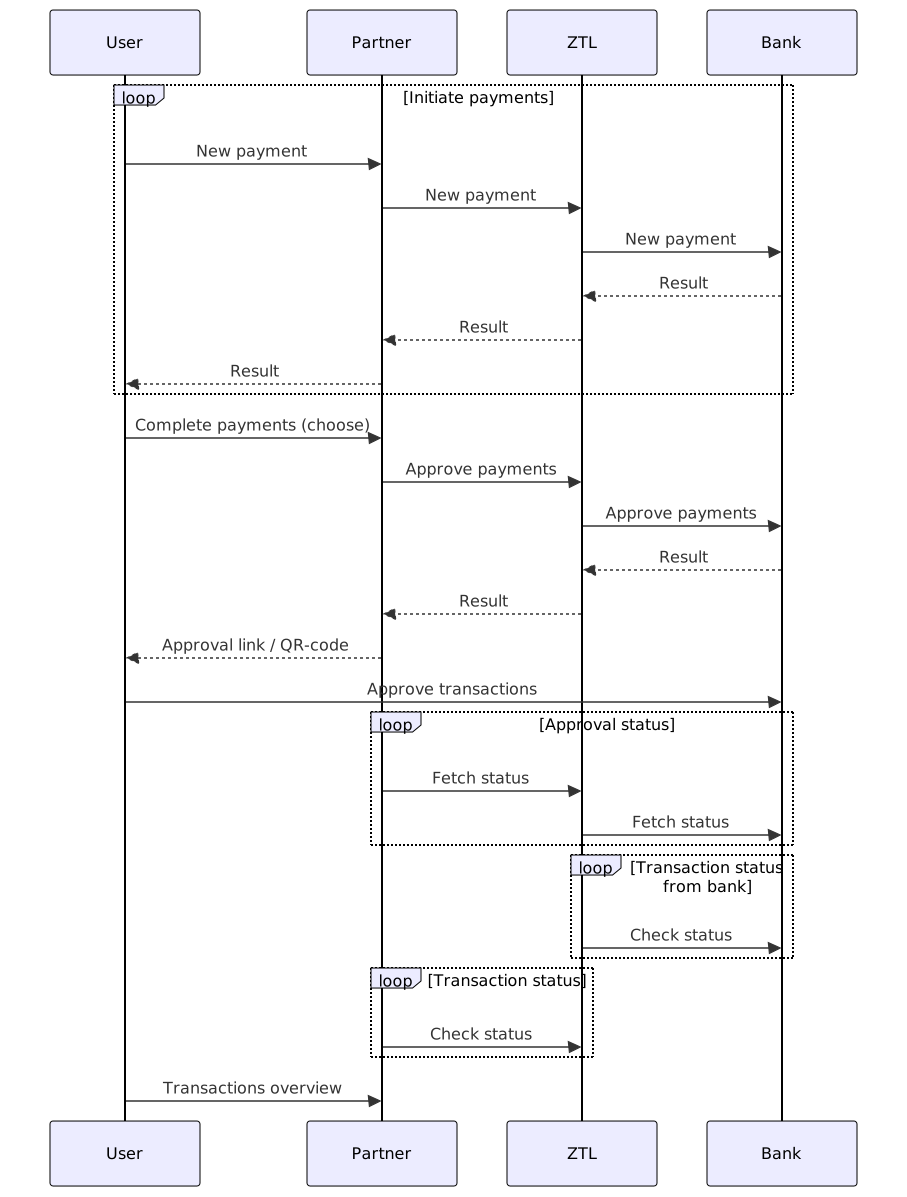
Domestic payment initiation
Initiates a new domestic payment, and returns status. Normally the status will be Unsigned, indicating that the payment needs to be approved before executed. Some payments do not require signing, this is dependent on the bank account configuration.
This endpoint is supported if the bank contains the product PAYMENT_DOMESTIC.
Authorizations:
header Parameters
| consent-id required | string <uuid> Example: 3a797348-ef0c-4f52-b821-fdfcdb98c4d9 A valid consentId |
| PSU-IP-Address required | string Example: 192.158.1.38 AAA IP Address of the end-user initiating the payment. DO NOT use any other IP address than what you can collect from the current user session that uses your system (don't use something stored in your DB). This information is used by the banks to manage traffic and handle security. |
| PSU-User-Agent required | string Example: Mozilla/5.0 (Windows NT 10.0; …) Gecko/20100101 Firefox/63.0 The forwarded Agent header field of the HTTP request between PSU and TPP. |
Request Body schema: application/json
required | object Metadata for the payment |
required | object Account information for debtor |
required | object Account information for creditor |
required | object (AmountAndCurrency) Amount and currency to be paid |
| dueDate required | string <date, ISO-8601> The due date for the payment |
RemittanceInformationMessage (object) or RemittanceInformationOcr (object) or RemittanceInformationFik (object) Remittance information, either OCR or Text message
| |
| purposeCode | string Enum: "SUPP" "TAXS" "SALA" "VATX" "OTHR" Purposecode for payment |
Responses
Request samples
- Payload
{- "metadata": {
- "endToEndId": "73300aefd8494872b0c6f44e07a841f3"
}, - "from": {
- "account": {
- "type": "bban",
- "bban": 97105048304
}, - "contactInformation": {
- "name": "ZTL Payment Solution AS",
- "telephoneNumber": "+4740000858",
- "address": {
- "streetName": "Akersgata",
- "buildingNumber": "32",
- "city": "Oslo",
- "postCode": "0180",
- "country": "NO"
}
}, - "currency": "NOK",
- "organizationNumber": 920970931
}, - "to": {
- "account": {
- "type": "bban",
- "bban": 97105048304
}, - "contactInformation": {
- "name": "ZTL Payment Solution AS",
- "telephoneNumber": "+4740000858",
- "address": {
- "streetName": "Akersgata",
- "buildingNumber": "32",
- "city": "Oslo",
- "postCode": "0180",
- "country": "NO"
}
}
}, - "amount": {
- "amount": "1000.50",
- "currency": "NOK"
}, - "dueDate": "2024-01-15",
- "remittanceInformation": {
- "type": "message",
- "value": "Payment for invoice 12345",
- "debtorReference": "string"
}, - "purposeCode": "SUPP"
}Response samples
- 200
- 400
- 403
- 404
- 409
- 422
- 500
- 503
{- "paymentId": "7c628b2e-9094-4bf8-af23-1d517c6fc4f5",
- "paymentStatus": {
- "status": "Unsigned",
- "statusReason": "PartlySigned",
- "statusReasonText": "string",
- "timestamp": "2024-03-19T09:34:57.657733682+01:00"
}
}Payment approval
Start approval/signing process of a list of unsigned or partlySigned transactions. Can be both domestic and cross-border transactions.
Authorizations:
header Parameters
| consent-id required | string <uuid> Example: 3a797348-ef0c-4f52-b821-fdfcdb98c4d9 A valid consentId |
| PSU-IP-Address required | string Example: 192.158.1.38 AAA IP Address of the end-user initiating the payment. DO NOT use any other IP address than what you can collect from the current user session that uses your system (don't use something stored in your DB). This information is used by the banks to manage traffic and handle security. |
| PSU-User-Agent required | string Example: Mozilla/5.0 (Windows NT 10.0; …) Gecko/20100101 Firefox/63.0 The forwarded Agent header field of the HTTP request between PSU and TPP. |
Request Body schema: application/json
| payments required | Array of strings <uuid> non-empty unique [ items <uuid > ] |
| callbackUrl required | string Sca callback url for redirect authentication |
| preferredScaMethod | string Enum: "Redirect" "Qr" The preferred way to perform authorization. There is no guarantee that bank supports the preferred method. |
Responses
Request samples
- Payload
{- "payments": [
- "175be5fc-4185-4cf1-af70-df34ead1a9ec",
- "4b24e1e8-f2ba-4d84-86a4-f5d5e4ae9af7"
], - "preferredScaMethod": "Redirect"
}Response samples
- 200
- 400
- 403
- 404
- 409
- 500
- 503
{- "id": "7c628b2e-9094-4bf8-af23-1d517c6fc4f5",
- "status": "STARTED",
- "sca": {
- "type": "redirect",
}
}Payment status
Retrieves latest payments status.
Authorizations:
path Parameters
| paymentId required | string <uuid> Example: 7c628b2e-9094-4bf8-af23-1d517c6fc4f5 Id received when creating the payment |
Responses
Response samples
- 200
- 400
- 403
- 404
- 409
- 500
- 503
{- "status": "Unsigned",
- "statusReason": "PartlySigned",
- "statusReasonText": "string",
- "timestamp": "2024-03-19T09:34:57.657733682+01:00"
}Payment approval status
Approval status indicates the status of a started payment approval. If the QR Sca approach are used, this endpoint gives updated QR picture. This picture is only valid for a short time, so a new picture has to be fetched every 1 second. QR is only available in Sweden.
Authorizations:
path Parameters
| id required | string <uuid> Example: 7c628b2e-9094-4bf8-af23-1d517c6fc4f5 Id received when creating an approval for payments |
header Parameters
| consent-id required | string <uuid> Example: 3a797348-ef0c-4f52-b821-fdfcdb98c4d9 A valid consentId |
| PSU-IP-Address required | string Example: 192.158.1.38 AAA IP Address of the end-user initiating the payment. DO NOT use any other IP address than what you can collect from the current user session that uses your system (don't use something stored in your DB). This information is used by the banks to manage traffic and handle security. |
| PSU-User-Agent required | string Example: Mozilla/5.0 (Windows NT 10.0; …) Gecko/20100101 Firefox/63.0 The forwarded Agent header field of the HTTP request between PSU and TPP. |
Responses
Response samples
- 200
- 400
- 403
- 404
- 409
- 500
- 503
{- "id": "7c628b2e-9094-4bf8-af23-1d517c6fc4f5",
- "status": "STARTED",
- "sca": {
- "type": "redirect",
}
}Cancel payment
Cancels a payment. May required approval (dependent on bank and payment status).
Authorizations:
header Parameters
| consent-id required | string <uuid> Example: 3a797348-ef0c-4f52-b821-fdfcdb98c4d9 A valid consentId |
| PSU-IP-Address | string Example: 192.158.1.38 AAA IP Address of the end-user initiating the payment. DO NOT use any other IP address than what you can collect from the current user session that uses your system (don't use something stored in your DB). This information is used by the banks to manage traffic and handle security. |
| PSU-User-Agent | string Example: Mozilla/5.0 (Windows NT 10.0; …) Gecko/20100101 Firefox/63.0 The forwarded Agent header field of the HTTP request between PSU and TPP. |
Request Body schema: application/json
| paymentId required | string Payment id to be cancelled |
| callbackUrl required | string Callback url for redirect authentication |
| preferredScaMethod | string Enum: "Redirect" "Qr" Prefered sca method. Qr only supported in Sweden. |
Responses
Request samples
- Payload
{- "paymentId": "7c628b2e-9094-4bf8-af23-1d517c6fc4f5",
- "preferredScaMethod": "Redirect"
}Response samples
- 200
- 400
- 403
- 404
- 409
- 500
- 503
{- "id": "497f6eca-6276-4993-bfeb-53cbbbba6f08",
- "sca": {
- "type": "redirect",
}, - "cancellationRequestStatus": "ACCEPTED",
- "currentPaymentStatus": {
- "status": "Unsigned",
- "statusReason": "PartlySigned",
- "statusReasonText": "string",
- "timestamp": "2024-03-19T09:34:57.657733682+01:00"
}, - "reason": null
}Initiate cross-border payment
Initiates a cross-border payment, this includes all transactions involving currency accounts. If the transaction requires exchange it will result in a psd2 domestic payment to ZTL's client account, these payment must be signed within deadline (2 or 5 minutes), if not it gets automatically cancelled. Payments that do not require exchange will go through the bank as cross-border payments.
We request that when a cross-border payment is initiated and due date is today or tomorrow (if initiated after 16:00) that you give user a warning if balance is less than value of the payment. Reason for this warning is to remind those who are lacking funds that they do not have funds and to avoid the payment being delayed or in worst case cancelled.
See Country and Currencies endpoint supported countries, currencies and constraints.
Authorizations:
header Parameters
| consent-id required | string <uuid> Example: 3a797348-ef0c-4f52-b821-fdfcdb98c4d9 A valid consentId |
| PSU-IP-Address required | string Example: 192.158.1.38 AAA IP Address of the end-user initiating the payment. DO NOT use any other IP address than what you can collect from the current user session that uses your system (don't use something stored in your DB). This information is used by the banks to manage traffic and handle security. |
| PSU-User-Agent required | string Example: Mozilla/5.0 (Windows NT 10.0; …) Gecko/20100101 Firefox/63.0 The forwarded Agent header field of the HTTP request between PSU and TPP. |
Request Body schema: application/json
required | object (PaymentMetadata) |
required | object (From) |
required | object (To) |
required | object (AmountAndCurrency) Amount and currency to be paid |
| dueDate required | string <date> The due date for the psd2 transaction from user account to ZTL client account. Payout to creditor account are usually 2 business days later |
required | object |
object Information used for regulatory reporting, only applicable in Norway and Sweden. Required for payments above 100 000 NOK in Norway, and 150 000 SEK in Sweden. |
Responses
Request samples
- Payload
{- "metadata": {
- "endToEndId": "string"
}, - "from": {
- "account": {
- "type": "bban",
- "bic": "ESSESESS",
- "bban": 12341212345
}, - "contactInformation": {
- "name": "ZTL Payment Solution AS",
- "address": {
- "streetName": "Akersgata",
- "buildingNumber": 32,
- "city": "Oslo",
- "postCode": "0180",
- "country": "NO"
}, - "telephoneNumber": "+4740000858"
}, - "currency": "NOK",
- "organizationNumber": 920970931
}, - "to": {
- "account": {
- "type": "bban",
- "bic": "ESSESESS",
- "bban": 12341212345,
- "clearingCode": 1234
}, - "contactInformation": {
- "name": "ZTL Payment Solution AS",
- "address": {
- "streetName": "Akersgata",
- "buildingNumber": 32,
- "city": "Oslo",
- "postCode": "0180",
- "country": "NO"
}
}
}, - "amount": {
- "amount": "1000.50",
- "currency": "NOK"
}, - "dueDate": "2019-08-24",
- "remittanceInformation": {
- "message": "string",
- "additionalInformation": [
- {
- "type": "Reason",
- "value": "string"
}
], - "debtorReference": "string"
}, - "regulatoryReporting": {
- "code": "14",
- "information": "string"
}
}Response samples
- 200
- 400
- 403
- 404
- 409
- 422
- 500
- 503
{- "paymentId": "string",
- "paymentStatus": {
- "status": "Unsigned",
- "statusReason": "PartlySigned",
- "statusReasonText": "string",
- "timestamp": "2024-03-19T09:34:57.657733682+01:00"
}, - "costAmount": {
- "amount": "1000.50",
- "currency": "NOK"
}, - "exchangeRate": 1.0346,
- "quoteExpiryTime": "2023-01-15T09:32:00+01:00",
- "intermediaryAccount": {
- "account": {
- "iban": "SE7250000000012341212345",
- "bban": 12341212345,
- "bic": "ESSESESS",
- "clearingCode": 1234
}, - "contactInformation": {
- "name": "ZTL Payment Solution AS",
- "address": {
- "streetName": "Eriksbergsgatan",
- "buildingNumber": 10,
- "city": "Sweden",
- "postCode": 11430,
- "country": "SE"
}
}
}
}Initiate bulk payment(s)
Initiates a list of payments with started approval/signing. This endpoint is exclusively supported for banks that do not support single payments/approval - see banks supported products (PAYMENT_BULK). This is currently only supported by Danske Bank and Handelsbanken Sweden. The response gives an id for the bulk status, which must be used in fetch status for bulk endpoint. This endpoint gives Id for the payments, which again can be used to fetch payment status. In some cases, the payment Ids are only available after the approval/signing process has completed.
Authorizations:
header Parameters
| consent-id required | string <uuid> Example: 3a797348-ef0c-4f52-b821-fdfcdb98c4d9 A valid consentId |
| PSU-IP-Address required | string Example: 192.158.1.38 AAA IP Address of the end-user initiating the payment. DO NOT use any other IP address than what you can collect from the current user session that uses your system (don't use something stored in your DB). This information is used by the banks to manage traffic and handle security. |
| PSU-User-Agent required | string Example: Mozilla/5.0 (Windows NT 10.0; …) Gecko/20100101 Firefox/63.0 The forwarded Agent header field of the HTTP request between PSU and TPP. |
Request Body schema: application/json
required | Array of Domestic payment (object) or Cross-border payment (object) non-empty |
| callbackUrl required | string Sca callback url for redirect authentication |
Responses
Request samples
- Payload
{- "payments": [
- {
- "type": "domestic",
- "metadata": {
- "endToEndId": "73300aefd8494872b0c6f44e07a841f3"
}, - "from": {
- "account": {
- "type": "bban",
- "bban": 97105048304
}, - "contactInformation": {
- "name": "ZTL Payment Solution AS",
- "telephoneNumber": "+4740000858",
- "address": {
- "streetName": "Akersgata",
- "buildingNumber": "32",
- "city": "Oslo",
- "postCode": "0180",
- "country": "NO"
}
}, - "currency": "NOK",
- "organizationNumber": 920970931
}, - "to": {
- "account": {
- "type": "bban",
- "bban": 97105048304
}, - "contactInformation": {
- "name": "ZTL Payment Solution AS",
- "telephoneNumber": "+4740000858",
- "address": {
- "streetName": "Akersgata",
- "buildingNumber": "32",
- "city": "Oslo",
- "postCode": "0180",
- "country": "NO"
}
}
}, - "amount": {
- "amount": "1000.50",
- "currency": "NOK"
}, - "dueDate": "2024-01-15",
- "remittanceInformation": {
- "type": "message",
- "value": "Payment for invoice 12345",
- "debtorReference": "string"
}, - "purposeCode": "SUPP"
}
],
}Response samples
- 200
- 400
- 403
- 404
- 409
- 422
- 500
- 503
{- "id": "497f6eca-6276-4993-bfeb-53cbbbba6f08",
- "sca": {
- "type": "redirect",
}, - "transactions": [
- {
- "id": "497f6eca-6276-4993-bfeb-53cbbbba6f08",
- "endToEndId": "string",
- "costAmount": {
- "amount": "1000.50",
- "currency": "NOK"
}, - "exchangeRate": 0,
- "quoteExpiryTime": "string",
- "intermediaryAccount": {
- "account": {
- "iban": "SE7250000000012341212345",
- "bban": 12341212345,
- "bic": "ESSESESS",
- "clearingCode": 1234
}, - "contactInformation": {
- "name": "ZTL Payment Solution AS",
- "address": {
- "streetName": "Eriksbergsgatan",
- "buildingNumber": 10,
- "city": "Sweden",
- "postCode": 11430,
- "country": "SE"
}
}
}
}
]
}Fetch status for bulk payment
Fetches the status of a bulk along with the individual payments.
Authorizations:
path Parameters
| bulkId required | string <uuid> Example: 7c628b2e-9094-4bf8-af23-1d517c6fc4f5 Id received when creating bulk payment |
Responses
Response samples
- 200
- 400
- 403
- 404
- 409
- 500
- 503
{- "bulkStatus": "CREATED",
- "transactions": [
- {
- "id": "497f6eca-6276-4993-bfeb-53cbbbba6f08",
- "endToEndId": "string"
}
]
}Get regulatory reporting codes
Retrieves a list of regulatory reporting codes for a specific country. Currently only supported for NO and SE. These codes are used for regulatory reporting when making cross-border payments. Commonly required for payments above 100 000 NOK in Norway, and 150 000 SEK in Sweden.
Authorizations:
path Parameters
| countryCode required | string Example: NO ISO 3166 country code |
Responses
Response samples
- 200
- 400
- 404
- 500
- 503
{- "codes": [
- {
- "code": "14",
- "description": "Kjøp/salg av varer"
}
]
}Payment Progress PDF
Generates a PDF report detailing the current progress of a payment.
A PDF report can only be generated for cross-border payments with an exchange and payment status is in one of the following states:
InProgress
When the payment is in the 'InProgress' state and funds have not yet been received by ZTL, the PDF will show payment status "Scheduled"
When the payment is in the 'InProgress' state and funds have been received by ZTL, the PDF will show payment status "In progress"
Completed
When the payment is in the 'Completed' state, the PDF will show payment status "Sent to bank"
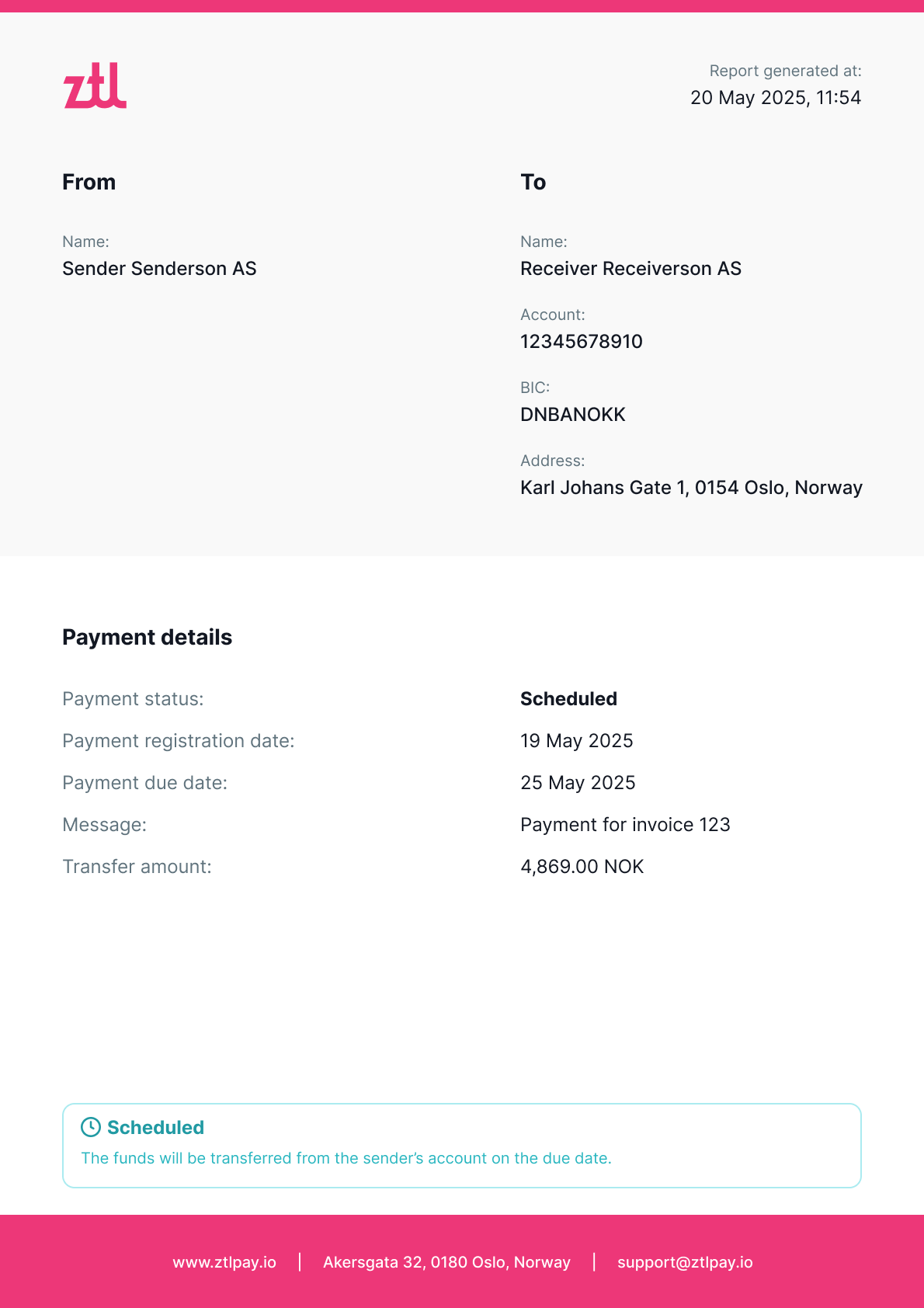
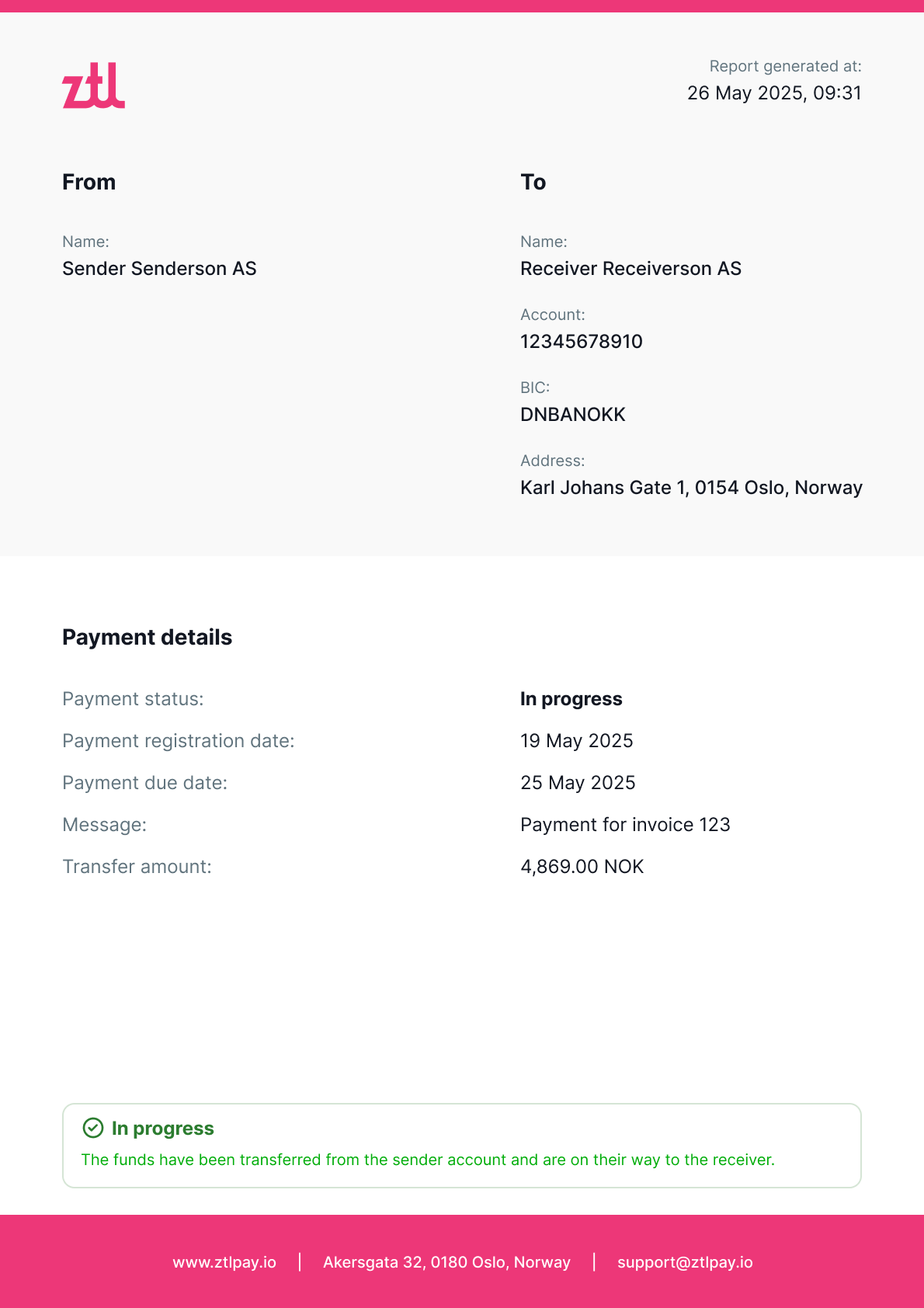
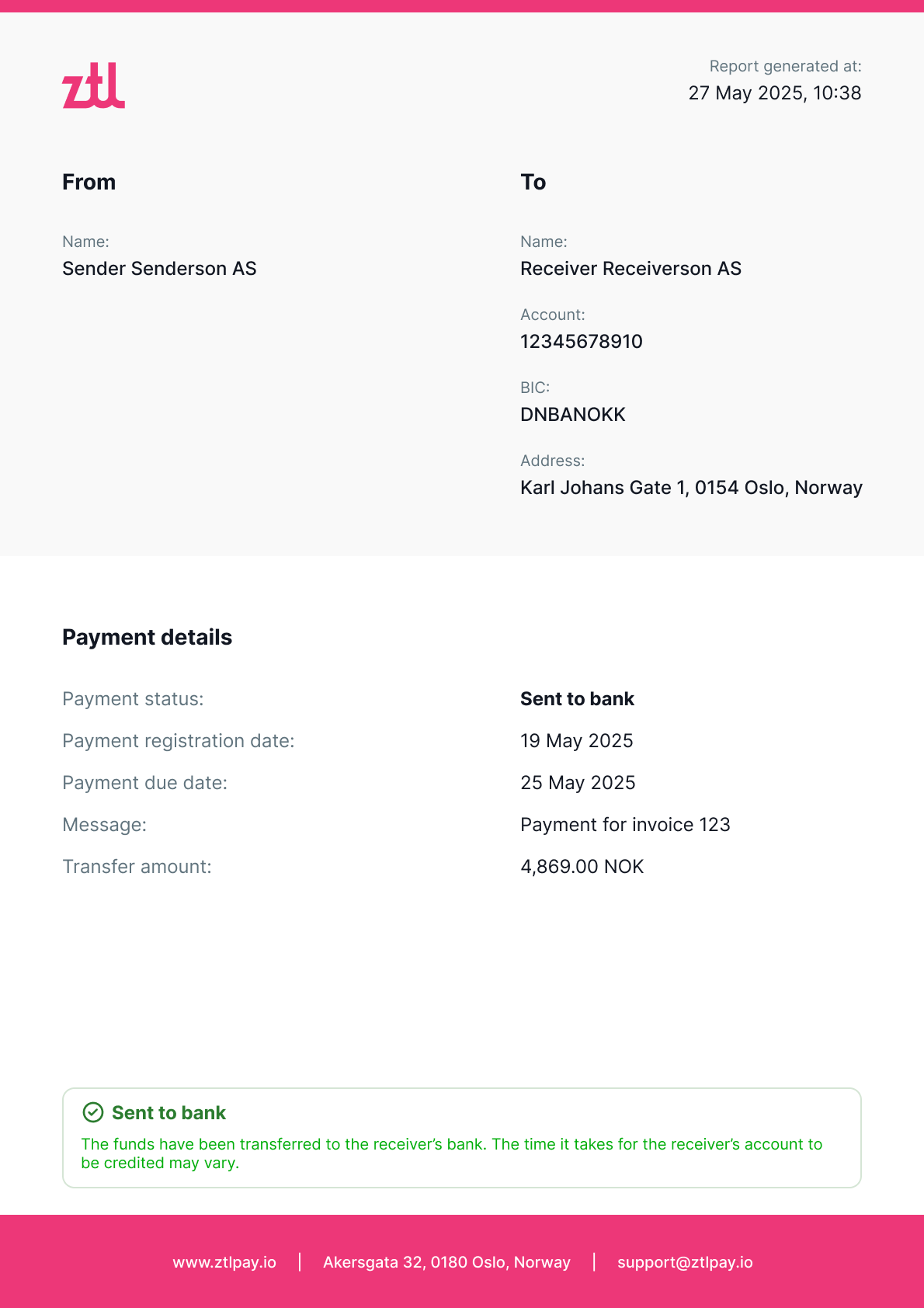
Authorizations:
path Parameters
| paymentId required | string <uuid> Example: 7c628b2e-9094-4bf8-af23-1d517c6fc4f5 Id received when creating the payment |
Responses
Response samples
- 400
- 403
- 404
- 500
{- "ztlRequestId": "3a797348-ef0c-4f52-b821-fdfcdb98c4d9",
- "message": "string"
}Services related to companies. Retrieve information about onboarded companies, enable/disable compay and list supported company types.
Onboarded companies
Get list of all companies onboarded by the partner
Authorizations:
header Parameters
| Authorization | string <Bearer JWT> Example: Bearer eyJhbGciOiJSUzI1NiIsImtpZCI6IkE1NEZCQjFGRjgzRTZFRUFEQUI1MTg4QTJBMkVGRDhGNTUzMEUzNDkiLCJ0eXAiOiJKV1QiLCJ4NXQiOiJwVS03SF9nLWJ1cmF0UmlLS2k3OWoxVXc0MGsifQ.eyJuYmYiOjE1NjI4MzE1OTIsImV4cCI6MTU2MjgzNTE5MiwiaXNzIjoiaHR0cHM6Ly9vaWRjLnp0bC5zdGFjY2Zsb3cubmV0IiwiYXVkIjpbImh0dHBzOi8vb2lkYy56dGwuc3RhY2NmbG93Lm5ldC9yZXNvdXJjZXMiLCJ6dGwtYXBpIiwicG9ydGFsLWFwaSJdLCJjbGllbnRfaWQiOiJkZXZjbGllbnQiLCJzY29wZSI6WyJwYXltZW50cyIsInBvcnRhbC1hcGkiXX0.dJuDJNTsSBhQ_xmN3ruqbBZvJdyn2nUkUW3NEwbgXw_l-UA3_XRmtp16rWWdhMLbh-D_HywwG2a0h-MK2tX17C-ggsfp_pDxj8iy8aLleI3dY1qt0VkQY8rOw5_YtWa40HWwIBK9Ll8MqovwBK4lg9Pkq_KLGdkoz87n63QezS5u0JeWYJJnHFuY5ojX_M5szAdSYoVYOyvL0tr30ynxb3joglKrVWlkeawRZztRV4chFN00tlv_Tn54vDYOyDPtBWK6JpMVqhHla8a5JnslJu5dUP82qtgms_lFYOiR1oD2jaa-t0QTE6MVwspG3kwQBSSSZawe-9G4yEBg-nFSGg Bearer Authorization token - A JWT token used to authenticate the request. Please refer to the Authorization section of our docs. |
Responses
Response samples
- 200
[- {
- "organizationNumber": "string",
- "activeSubscription": true
}
]Supported company types
Get list of supported company types
Authorizations:
path Parameters
| countryCode required | string Example: NO |
header Parameters
| Authorization | string <Bearer JWT> Example: Bearer eyJhbGciOiJSUzI1NiIsImtpZCI6IkE1NEZCQjFGRjgzRTZFRUFEQUI1MTg4QTJBMkVGRDhGNTUzMEUzNDkiLCJ0eXAiOiJKV1QiLCJ4NXQiOiJwVS03SF9nLWJ1cmF0UmlLS2k3OWoxVXc0MGsifQ.eyJuYmYiOjE1NjI4MzE1OTIsImV4cCI6MTU2MjgzNTE5MiwiaXNzIjoiaHR0cHM6Ly9vaWRjLnp0bC5zdGFjY2Zsb3cubmV0IiwiYXVkIjpbImh0dHBzOi8vb2lkYy56dGwuc3RhY2NmbG93Lm5ldC9yZXNvdXJjZXMiLCJ6dGwtYXBpIiwicG9ydGFsLWFwaSJdLCJjbGllbnRfaWQiOiJkZXZjbGllbnQiLCJzY29wZSI6WyJwYXltZW50cyIsInBvcnRhbC1hcGkiXX0.dJuDJNTsSBhQ_xmN3ruqbBZvJdyn2nUkUW3NEwbgXw_l-UA3_XRmtp16rWWdhMLbh-D_HywwG2a0h-MK2tX17C-ggsfp_pDxj8iy8aLleI3dY1qt0VkQY8rOw5_YtWa40HWwIBK9Ll8MqovwBK4lg9Pkq_KLGdkoz87n63QezS5u0JeWYJJnHFuY5ojX_M5szAdSYoVYOyvL0tr30ynxb3joglKrVWlkeawRZztRV4chFN00tlv_Tn54vDYOyDPtBWK6JpMVqhHla8a5JnslJu5dUP82qtgms_lFYOiR1oD2jaa-t0QTE6MVwspG3kwQBSSSZawe-9G4yEBg-nFSGg Bearer Authorization token - A JWT token used to authenticate the request. Please refer to the Authorization section of our docs. |
Responses
Response samples
- 200
[- {
- "code": "AS",
- "description": "Aksjeselskap"
}
]Activate subscription
Activate the subscription for the given company
Authorizations:
path Parameters
| countryCode required | string Example: NO |
| organizationNumber required | string |
header Parameters
| Authorization | string <Bearer JWT> Example: Bearer eyJhbGciOiJSUzI1NiIsImtpZCI6IkE1NEZCQjFGRjgzRTZFRUFEQUI1MTg4QTJBMkVGRDhGNTUzMEUzNDkiLCJ0eXAiOiJKV1QiLCJ4NXQiOiJwVS03SF9nLWJ1cmF0UmlLS2k3OWoxVXc0MGsifQ.eyJuYmYiOjE1NjI4MzE1OTIsImV4cCI6MTU2MjgzNTE5MiwiaXNzIjoiaHR0cHM6Ly9vaWRjLnp0bC5zdGFjY2Zsb3cubmV0IiwiYXVkIjpbImh0dHBzOi8vb2lkYy56dGwuc3RhY2NmbG93Lm5ldC9yZXNvdXJjZXMiLCJ6dGwtYXBpIiwicG9ydGFsLWFwaSJdLCJjbGllbnRfaWQiOiJkZXZjbGllbnQiLCJzY29wZSI6WyJwYXltZW50cyIsInBvcnRhbC1hcGkiXX0.dJuDJNTsSBhQ_xmN3ruqbBZvJdyn2nUkUW3NEwbgXw_l-UA3_XRmtp16rWWdhMLbh-D_HywwG2a0h-MK2tX17C-ggsfp_pDxj8iy8aLleI3dY1qt0VkQY8rOw5_YtWa40HWwIBK9Ll8MqovwBK4lg9Pkq_KLGdkoz87n63QezS5u0JeWYJJnHFuY5ojX_M5szAdSYoVYOyvL0tr30ynxb3joglKrVWlkeawRZztRV4chFN00tlv_Tn54vDYOyDPtBWK6JpMVqhHla8a5JnslJu5dUP82qtgms_lFYOiR1oD2jaa-t0QTE6MVwspG3kwQBSSSZawe-9G4yEBg-nFSGg Bearer Authorization token - A JWT token used to authenticate the request. Please refer to the Authorization section of our docs. |
Responses
Response samples
- 400
- 403
{- "type": "urn:quote-failed",
- "title": "Payment rejected",
- "detail": null,
- "instance": "/api/payments/56563af2-a199-44ec-92a1-d77eed2d8562/status"
}Cancel subscription
Cancel the subscription for the given company
Authorizations:
path Parameters
| countryCode required | string Example: NO |
| organizationNumber required | string |
Responses
Response samples
- 400
{- "type": "urn:quote-failed",
- "title": "Payment rejected",
- "detail": null,
- "instance": "/api/payments/56563af2-a199-44ec-92a1-d77eed2d8562/status"
}FX can either be used with or without bank integration. For bank integration, please see Flow for cross-border payment with bank integration
The partner is responsible to handle the domestic bank integration, or present the required payment instructions for domestic transaction to the user.
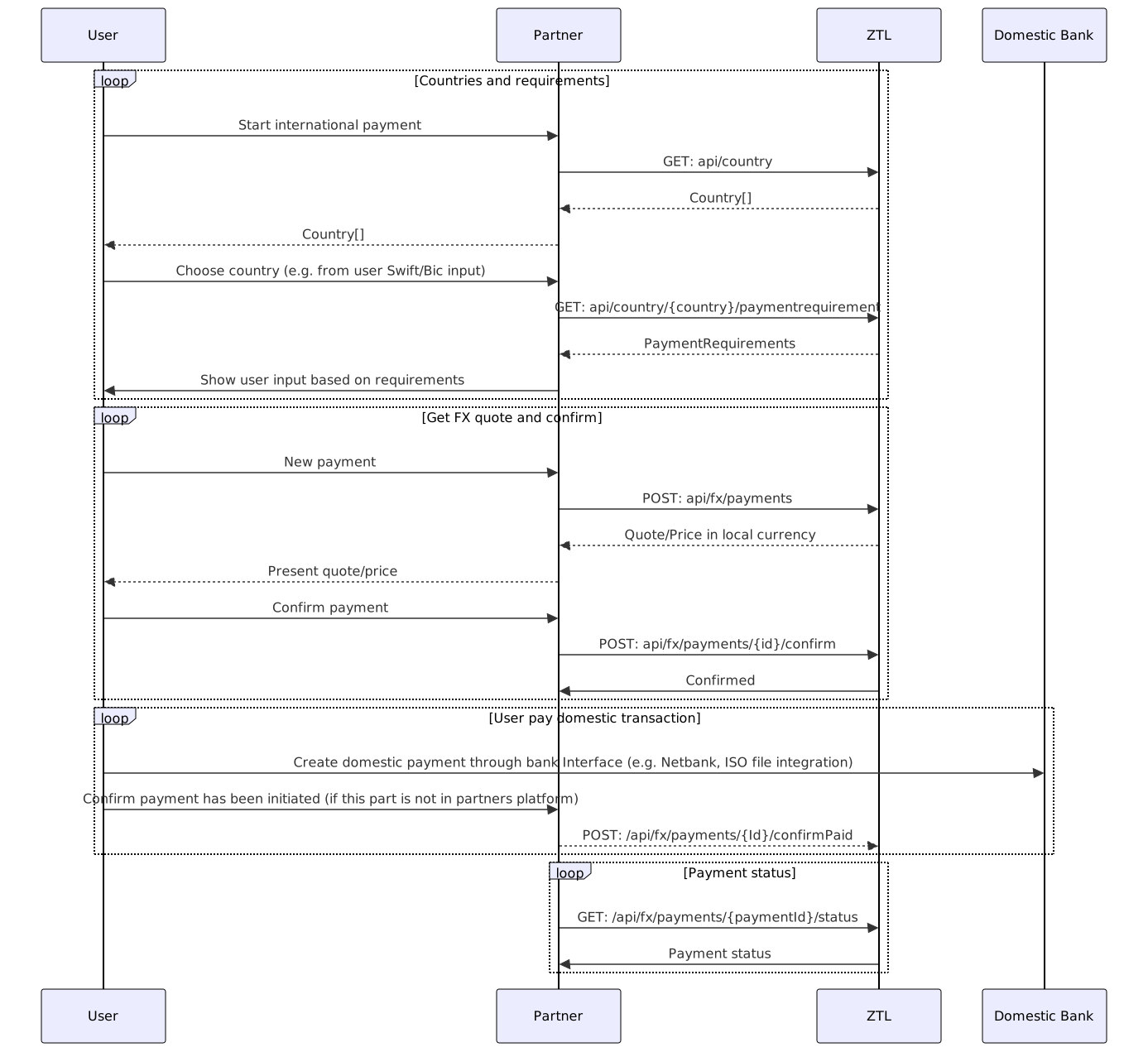
Validation
International payment validation request. It is strongly recommended to use country-specific requirements endpoint before forming a validation/initiation request to provide a good user experience.
Authorizations:
header Parameters
| Authorization | string <Bearer JWT> Example: Bearer eyJhbGciOiJSUzI1NiIsImtpZCI6IkE1NEZCQjFGRjgzRTZFRUFEQUI1MTg4QTJBMkVGRDhGNTUzMEUzNDkiLCJ0eXAiOiJKV1QiLCJ4NXQiOiJwVS03SF9nLWJ1cmF0UmlLS2k3OWoxVXc0MGsifQ.eyJuYmYiOjE1NjI4MzE1OTIsImV4cCI6MTU2MjgzNTE5MiwiaXNzIjoiaHR0cHM6Ly9vaWRjLnp0bC5zdGFjY2Zsb3cubmV0IiwiYXVkIjpbImh0dHBzOi8vb2lkYy56dGwuc3RhY2NmbG93Lm5ldC9yZXNvdXJjZXMiLCJ6dGwtYXBpIiwicG9ydGFsLWFwaSJdLCJjbGllbnRfaWQiOiJkZXZjbGllbnQiLCJzY29wZSI6WyJwYXltZW50cyIsInBvcnRhbC1hcGkiXX0.dJuDJNTsSBhQ_xmN3ruqbBZvJdyn2nUkUW3NEwbgXw_l-UA3_XRmtp16rWWdhMLbh-D_HywwG2a0h-MK2tX17C-ggsfp_pDxj8iy8aLleI3dY1qt0VkQY8rOw5_YtWa40HWwIBK9Ll8MqovwBK4lg9Pkq_KLGdkoz87n63QezS5u0JeWYJJnHFuY5ojX_M5szAdSYoVYOyvL0tr30ynxb3joglKrVWlkeawRZztRV4chFN00tlv_Tn54vDYOyDPtBWK6JpMVqhHla8a5JnslJu5dUP82qtgms_lFYOiR1oD2jaa-t0QTE6MVwspG3kwQBSSSZawe-9G4yEBg-nFSGg Bearer Authorization token - A JWT token used to authenticate the request. Please refer to the Authorization section of our docs. |
Request Body schema: application/json
required | object Metadata for quote request |
required | object Information about the debtor |
required | object Information about the creditor |
required | object The amount and currency for the quote |
| dueDate required | string <date, ISO-8601> The due date for the payment. NOTE: there are limitations on due date in the further |
required | object Remittance information |
| purposeCode | string Deprecated A code stating the purpose of the payment. (Required by some countries). Deprecated - use Information.RemittanceInformation.AdditionalInformation (type - Purpose) instead |
Responses
Request samples
- Payload
{- "metadata": {
- "organizationCountryCode": "NO",
- "organizationNumber": 920970931,
- "endToEndId": "73300aef-d849-4872-b0c6-f44e07a841f3"
}, - "from": {
- "bban": 12341212345,
- "bic": "DNBANOKK",
- "contactInformation": {
- "name": "ZTL Payment Solution AS",
- "address": {
- "streetName": "Kristian IVs gate",
- "buildingNumber": 15,
- "city": "Oslo",
- "postCode": "0164",
- "country": "NO"
}
}, - "currency": "NOK",
- "country": "NO"
}, - "to": {
- "account": {
- "iban": "SE7250000000012341212345",
- "bban": 12341212345,
- "bic": "ESSESESS",
- "clearingCode": 1234
}, - "contactInformation": {
- "name": "ZTL Payment Solution AS",
- "address": {
- "streetName": "Eriksbergsgatan",
- "buildingNumber": 10,
- "city": "Sweden",
- "postCode": 11430,
- "country": "SE"
}
}, - "currency": "SEK"
}, - "amount": {
- "amount": "1000.50",
- "currency": "SEK"
}, - "dueDate": "2023-01-15",
- "remittanceInformation": {
- "unstructured": "Payment for consulting services",
- "additionalInformation": [
- {
- "type": "Reason",
- "value": "string"
}
]
}, - "purposeCode": "S1008"
}Response samples
- 400
- 422
{- "code": "InvalidJsonRequest",
- "reason": "Malformed request body",
- "path": ".from.bban"
}Payment Initiation
International payment quote request
We request that when a fx payment is initiated and due date is today or tomorrow (if initiated after 16:00) that you give user a warning if balance is less than value of the payment before calling confirm. Reason for this warning is to remind those who are lacking funds that they do not have funds and to avoid the payment being delayed or in worst case cancelled.
Authorizations:
header Parameters
| Authorization | string <Bearer JWT> Example: Bearer eyJhbGciOiJSUzI1NiIsImtpZCI6IkE1NEZCQjFGRjgzRTZFRUFEQUI1MTg4QTJBMkVGRDhGNTUzMEUzNDkiLCJ0eXAiOiJKV1QiLCJ4NXQiOiJwVS03SF9nLWJ1cmF0UmlLS2k3OWoxVXc0MGsifQ.eyJuYmYiOjE1NjI4MzE1OTIsImV4cCI6MTU2MjgzNTE5MiwiaXNzIjoiaHR0cHM6Ly9vaWRjLnp0bC5zdGFjY2Zsb3cubmV0IiwiYXVkIjpbImh0dHBzOi8vb2lkYy56dGwuc3RhY2NmbG93Lm5ldC9yZXNvdXJjZXMiLCJ6dGwtYXBpIiwicG9ydGFsLWFwaSJdLCJjbGllbnRfaWQiOiJkZXZjbGllbnQiLCJzY29wZSI6WyJwYXltZW50cyIsInBvcnRhbC1hcGkiXX0.dJuDJNTsSBhQ_xmN3ruqbBZvJdyn2nUkUW3NEwbgXw_l-UA3_XRmtp16rWWdhMLbh-D_HywwG2a0h-MK2tX17C-ggsfp_pDxj8iy8aLleI3dY1qt0VkQY8rOw5_YtWa40HWwIBK9Ll8MqovwBK4lg9Pkq_KLGdkoz87n63QezS5u0JeWYJJnHFuY5ojX_M5szAdSYoVYOyvL0tr30ynxb3joglKrVWlkeawRZztRV4chFN00tlv_Tn54vDYOyDPtBWK6JpMVqhHla8a5JnslJu5dUP82qtgms_lFYOiR1oD2jaa-t0QTE6MVwspG3kwQBSSSZawe-9G4yEBg-nFSGg Bearer Authorization token - A JWT token used to authenticate the request. Please refer to the Authorization section of our docs. |
Request Body schema: application/json
required | object Metadata for quote request |
required | object Information about the debtor |
required | object Information about the creditor |
required | object The amount and currency for the quote |
| dueDate required | string <date, ISO-8601> The due date for the payment. NOTE: there are limitations on due date in the further |
required | object Remittance information |
| purposeCode | string Deprecated A code stating the purpose of the payment. (Required by some countries). Deprecated - use Information.RemittanceInformation.AdditionalInformation (type - Purpose) instead |
Responses
Request samples
- Payload
{- "metadata": {
- "organizationCountryCode": "NO",
- "organizationNumber": 920970931,
- "endToEndId": "73300aef-d849-4872-b0c6-f44e07a841f3"
}, - "from": {
- "bban": 12341212345,
- "bic": "DNBANOKK",
- "contactInformation": {
- "name": "ZTL Payment Solution AS",
- "address": {
- "streetName": "Kristian IVs gate",
- "buildingNumber": 15,
- "city": "Oslo",
- "postCode": "0164",
- "country": "NO"
}
}, - "currency": "NOK",
- "country": "NO"
}, - "to": {
- "account": {
- "iban": "SE7250000000012341212345",
- "bban": 12341212345,
- "bic": "ESSESESS",
- "clearingCode": 1234
}, - "contactInformation": {
- "name": "ZTL Payment Solution AS",
- "address": {
- "streetName": "Eriksbergsgatan",
- "buildingNumber": 10,
- "city": "Sweden",
- "postCode": 11430,
- "country": "SE"
}
}, - "currency": "SEK"
}, - "amount": {
- "amount": "1000.50",
- "currency": "SEK"
}, - "dueDate": "2023-01-15",
- "remittanceInformation": {
- "unstructured": "Payment for consulting services",
- "additionalInformation": [
- {
- "type": "Reason",
- "value": "string"
}
]
}, - "purposeCode": "S1008"
}Response samples
- 200
- 400
- 422
{- "quoteId": "d6f06bfe-4830-4358-b483-c24c66cfb431",
- "endToEndId": "7c628b2e-9094-4bf8-af23-1d517c6fc4f5",
- "requestedAmount": {
- "amount": "1000.50",
- "currency": "SEK"
}, - "costAmount": {
- "amount": 1034.62,
- "currency": "NOK"
}, - "exchangeRate": 1.0346,
- "quoteExpiryTime": "2023-01-15T09:32:00+01:00",
- "referenceCode": "ZTL-d6f06bfe",
- "intermediaryAccount": {
- "account": {
- "iban": "SE7250000000012341212345",
- "bban": 12341212345,
- "bic": "CITIXXXX"
}, - "contactInformation": {
- "name": "ZTL Payment Solution AS",
- "address": {
- "streetName": "Eriksbergsgatan",
- "buildingNumber": 10,
- "city": "Sweden",
- "postCode": 11430,
- "country": "SE"
}
}
}
}Payment Confirmation
International payment confirmation.
Authorizations:
path Parameters
| quoteId required | string quote id as for payment |
header Parameters
| Authorization | string <Bearer JWT> Example: Bearer eyJhbGciOiJSUzI1NiIsImtpZCI6IkE1NEZCQjFGRjgzRTZFRUFEQUI1MTg4QTJBMkVGRDhGNTUzMEUzNDkiLCJ0eXAiOiJKV1QiLCJ4NXQiOiJwVS03SF9nLWJ1cmF0UmlLS2k3OWoxVXc0MGsifQ.eyJuYmYiOjE1NjI4MzE1OTIsImV4cCI6MTU2MjgzNTE5MiwiaXNzIjoiaHR0cHM6Ly9vaWRjLnp0bC5zdGFjY2Zsb3cubmV0IiwiYXVkIjpbImh0dHBzOi8vb2lkYy56dGwuc3RhY2NmbG93Lm5ldC9yZXNvdXJjZXMiLCJ6dGwtYXBpIiwicG9ydGFsLWFwaSJdLCJjbGllbnRfaWQiOiJkZXZjbGllbnQiLCJzY29wZSI6WyJwYXltZW50cyIsInBvcnRhbC1hcGkiXX0.dJuDJNTsSBhQ_xmN3ruqbBZvJdyn2nUkUW3NEwbgXw_l-UA3_XRmtp16rWWdhMLbh-D_HywwG2a0h-MK2tX17C-ggsfp_pDxj8iy8aLleI3dY1qt0VkQY8rOw5_YtWa40HWwIBK9Ll8MqovwBK4lg9Pkq_KLGdkoz87n63QezS5u0JeWYJJnHFuY5ojX_M5szAdSYoVYOyvL0tr30ynxb3joglKrVWlkeawRZztRV4chFN00tlv_Tn54vDYOyDPtBWK6JpMVqhHla8a5JnslJu5dUP82qtgms_lFYOiR1oD2jaa-t0QTE6MVwspG3kwQBSSSZawe-9G4yEBg-nFSGg Bearer Authorization token - A JWT token used to authenticate the request. Please refer to the Authorization section of our docs. |
Responses
Response samples
- 200
- 400
{- "paymentId": "0db94e47-858c-4486-a0e9-a453e4da025d",
}Funding Payment Confirmation
Cross-border payment funding confirmation.
Authorizations:
path Parameters
| paymentId required | string paymentId for the payment to be confirmedPaid |
header Parameters
| Authorization | string <Bearer JWT> Example: Bearer eyJhbGciOiJSUzI1NiIsImtpZCI6IkE1NEZCQjFGRjgzRTZFRUFEQUI1MTg4QTJBMkVGRDhGNTUzMEUzNDkiLCJ0eXAiOiJKV1QiLCJ4NXQiOiJwVS03SF9nLWJ1cmF0UmlLS2k3OWoxVXc0MGsifQ.eyJuYmYiOjE1NjI4MzE1OTIsImV4cCI6MTU2MjgzNTE5MiwiaXNzIjoiaHR0cHM6Ly9vaWRjLnp0bC5zdGFjY2Zsb3cubmV0IiwiYXVkIjpbImh0dHBzOi8vb2lkYy56dGwuc3RhY2NmbG93Lm5ldC9yZXNvdXJjZXMiLCJ6dGwtYXBpIiwicG9ydGFsLWFwaSJdLCJjbGllbnRfaWQiOiJkZXZjbGllbnQiLCJzY29wZSI6WyJwYXltZW50cyIsInBvcnRhbC1hcGkiXX0.dJuDJNTsSBhQ_xmN3ruqbBZvJdyn2nUkUW3NEwbgXw_l-UA3_XRmtp16rWWdhMLbh-D_HywwG2a0h-MK2tX17C-ggsfp_pDxj8iy8aLleI3dY1qt0VkQY8rOw5_YtWa40HWwIBK9Ll8MqovwBK4lg9Pkq_KLGdkoz87n63QezS5u0JeWYJJnHFuY5ojX_M5szAdSYoVYOyvL0tr30ynxb3joglKrVWlkeawRZztRV4chFN00tlv_Tn54vDYOyDPtBWK6JpMVqhHla8a5JnslJu5dUP82qtgms_lFYOiR1oD2jaa-t0QTE6MVwspG3kwQBSSSZawe-9G4yEBg-nFSGg Bearer Authorization token - A JWT token used to authenticate the request. Please refer to the Authorization section of our docs. |
Responses
Response samples
- 200
- 400
{- "paymentId": "0db94e47-858c-4486-a0e9-a453e4da025d",
}Payment Status
International payment status inquiry.
Authorizations:
path Parameters
| paymentId required | string paymentId for the payment |
header Parameters
| Authorization | string <Bearer JWT> Example: Bearer eyJhbGciOiJSUzI1NiIsImtpZCI6IkE1NEZCQjFGRjgzRTZFRUFEQUI1MTg4QTJBMkVGRDhGNTUzMEUzNDkiLCJ0eXAiOiJKV1QiLCJ4NXQiOiJwVS03SF9nLWJ1cmF0UmlLS2k3OWoxVXc0MGsifQ.eyJuYmYiOjE1NjI4MzE1OTIsImV4cCI6MTU2MjgzNTE5MiwiaXNzIjoiaHR0cHM6Ly9vaWRjLnp0bC5zdGFjY2Zsb3cubmV0IiwiYXVkIjpbImh0dHBzOi8vb2lkYy56dGwuc3RhY2NmbG93Lm5ldC9yZXNvdXJjZXMiLCJ6dGwtYXBpIiwicG9ydGFsLWFwaSJdLCJjbGllbnRfaWQiOiJkZXZjbGllbnQiLCJzY29wZSI6WyJwYXltZW50cyIsInBvcnRhbC1hcGkiXX0.dJuDJNTsSBhQ_xmN3ruqbBZvJdyn2nUkUW3NEwbgXw_l-UA3_XRmtp16rWWdhMLbh-D_HywwG2a0h-MK2tX17C-ggsfp_pDxj8iy8aLleI3dY1qt0VkQY8rOw5_YtWa40HWwIBK9Ll8MqovwBK4lg9Pkq_KLGdkoz87n63QezS5u0JeWYJJnHFuY5ojX_M5szAdSYoVYOyvL0tr30ynxb3joglKrVWlkeawRZztRV4chFN00tlv_Tn54vDYOyDPtBWK6JpMVqhHla8a5JnslJu5dUP82qtgms_lFYOiR1oD2jaa-t0QTE6MVwspG3kwQBSSSZawe-9G4yEBg-nFSGg Bearer Authorization token - A JWT token used to authenticate the request. Please refer to the Authorization section of our docs. |
Responses
Response samples
- 200
{- "status": "PaymentFailed",
- "message": "Technical error."
}Payment Cancellation
International payment funding payment confirmation.
Authorizations:
path Parameters
| paymentId required | string paymentId for the payment to cancel |
header Parameters
| Authorization | string <Bearer JWT> Example: Bearer eyJhbGciOiJSUzI1NiIsImtpZCI6IkE1NEZCQjFGRjgzRTZFRUFEQUI1MTg4QTJBMkVGRDhGNTUzMEUzNDkiLCJ0eXAiOiJKV1QiLCJ4NXQiOiJwVS03SF9nLWJ1cmF0UmlLS2k3OWoxVXc0MGsifQ.eyJuYmYiOjE1NjI4MzE1OTIsImV4cCI6MTU2MjgzNTE5MiwiaXNzIjoiaHR0cHM6Ly9vaWRjLnp0bC5zdGFjY2Zsb3cubmV0IiwiYXVkIjpbImh0dHBzOi8vb2lkYy56dGwuc3RhY2NmbG93Lm5ldC9yZXNvdXJjZXMiLCJ6dGwtYXBpIiwicG9ydGFsLWFwaSJdLCJjbGllbnRfaWQiOiJkZXZjbGllbnQiLCJzY29wZSI6WyJwYXltZW50cyIsInBvcnRhbC1hcGkiXX0.dJuDJNTsSBhQ_xmN3ruqbBZvJdyn2nUkUW3NEwbgXw_l-UA3_XRmtp16rWWdhMLbh-D_HywwG2a0h-MK2tX17C-ggsfp_pDxj8iy8aLleI3dY1qt0VkQY8rOw5_YtWa40HWwIBK9Ll8MqovwBK4lg9Pkq_KLGdkoz87n63QezS5u0JeWYJJnHFuY5ojX_M5szAdSYoVYOyvL0tr30ynxb3joglKrVWlkeawRZztRV4chFN00tlv_Tn54vDYOyDPtBWK6JpMVqhHla8a5JnslJu5dUP82qtgms_lFYOiR1oD2jaa-t0QTE6MVwspG3kwQBSSSZawe-9G4yEBg-nFSGg Bearer Authorization token - A JWT token used to authenticate the request. Please refer to the Authorization section of our docs. |
Responses
Response samples
- 400
{- "message": "Payment has not been booked yet",
- "correlationId": "7757cdcb-128f-41ba-b3a6-58722e56b0f8"
}Payment Progress PDF
Generates a PDF report detailing the current progress of an FX payment.
A PDF report can only be generated if the payment status is in one of the following states:
Confirmed
When the payment is in the 'Confirmed' state the PDF will show payment status "Scheduled"
PaymentInProgress
When the payment is in the 'PaymentInProgress' state the PDF will show payment status "In progress"
Completed
When the payment is in the 'Completed' state the PDF will show payment status "Sent to bank"
Authorizations:
path Parameters
| paymentId required | string The paymentId of the payment for which to generate the progress PDF |
header Parameters
| Authorization | string <Bearer JWT> Example: Bearer eyJhbGciOiJSUzI1NiIsImtpZCI6IkE1NEZCQjFGRjgzRTZFRUFEQUI1MTg4QTJBMkVGRDhGNTUzMEUzNDkiLCJ0eXAiOiJKV1QiLCJ4NXQiOiJwVS03SF9nLWJ1cmF0UmlLS2k3OWoxVXc0MGsifQ.eyJuYmYiOjE1NjI4MzE1OTIsImV4cCI6MTU2MjgzNTE5MiwiaXNzIjoiaHR0cHM6Ly9vaWRjLnp0bC5zdGFjY2Zsb3cubmV0IiwiYXVkIjpbImh0dHBzOi8vb2lkYy56dGwuc3RhY2NmbG93Lm5ldC9yZXNvdXJjZXMiLCJ6dGwtYXBpIiwicG9ydGFsLWFwaSJdLCJjbGllbnRfaWQiOiJkZXZjbGllbnQiLCJzY29wZSI6WyJwYXltZW50cyIsInBvcnRhbC1hcGkiXX0.dJuDJNTsSBhQ_xmN3ruqbBZvJdyn2nUkUW3NEwbgXw_l-UA3_XRmtp16rWWdhMLbh-D_HywwG2a0h-MK2tX17C-ggsfp_pDxj8iy8aLleI3dY1qt0VkQY8rOw5_YtWa40HWwIBK9Ll8MqovwBK4lg9Pkq_KLGdkoz87n63QezS5u0JeWYJJnHFuY5ojX_M5szAdSYoVYOyvL0tr30ynxb3joglKrVWlkeawRZztRV4chFN00tlv_Tn54vDYOyDPtBWK6JpMVqhHla8a5JnslJu5dUP82qtgms_lFYOiR1oD2jaa-t0QTE6MVwspG3kwQBSSSZawe-9G4yEBg-nFSGg Bearer Authorization token - A JWT token used to authenticate the request. Please refer to the Authorization section of our docs. |
Responses
Response samples
- 400
- 403
- 404
- 500
{- "ztlRequestId": "3a797348-ef0c-4f52-b821-fdfcdb98c4d9",
- "message": "string"
}Helper methods for cross-border payment support. This API can be used to give user interface for bank account format input, supported currencies and additional payment remittance information requirements.
Cross-border payment requirements
Gives additional payment requirements per country. If the country additional remittance information, this information is mandatory.
Authorizations:
path Parameters
| country required | string 2-letters country code |
Responses
Response samples
- 200
{- "countryCode": "SE",
- "countryName": "Sweden",
- "localCurrency": "NOK",
- "acceptedCurrencies": [
- "EUR"
], - "supportedBankAccountFormats": [
- {
- "type": "iban"
}
], - "paymentRequirements": [
- {
- "type": "additionalRemittanceInformationRequired",
- "description": "string",
- "requirementType": "PurposeCode",
- "pattern": "string",
- "validCodes": [
- {
- "code": "string",
- "description": "string"
}
], - "painArrayIndex": 0
}
]
}